Tag: DevOps Training Institute in Hyderabad

  • Can AWS DevSecOps Reduce Vulnerabilities Faster?

    Can AWS DevSecOps Reduce Vulnerabilities Faster?

    Can AWS DevSecOps Reduce Vulnerabilities Faster?

    Introduction

    This is where AWS DevSecOps plays a crucial role. By embedding security directly into the DevOps lifecycle, organizations can detect and fix vulnerabilities much faster than before. For professionals learning through Aws DevOps Online Training, understanding how DevSecOps accelerates vulnerability reduction is a must-have skill, not an optional one.

    AWS DevSecOps shifts security left, meaning vulnerabilities are identified early during development rather than after deployment. This proactive approach dramatically reduces risk, cost, and recovery time.

    How AWS DevSecOps Accelerates Vulnerability Reduction

    Security Integrated from Day One

    One of the biggest advantages of AWS DevSecOps is that security is not treated as a final checkpoint. Instead, it is built into every phase of the software delivery lifecycle. From code commits to production deployment, automated security checks ensure vulnerabilities are caught early.

    Developers receive immediate feedback when insecure code is introduced, allowing issues to be fixed while the context is still fresh. This reduces delays and prevents small issues from turning into major security incidents.

    Automated Security Scanning

    AWS DevSecOps pipelines integrate automated tools that continuously scan code, containers, and dependencies for vulnerabilities. These scans run automatically during build and deployment stages, eliminating the need for manual security testing.

    In Aws DevOps Training Online, learners often see how automated scans dramatically shorten the time between vulnerability discovery and remediation. Instead of waiting weeks for a security review, teams can resolve issues within minutes or hours.

    Infrastructure as Code with Built-in Security

    Infrastructure as Code (IaC) is a key pillar of AWS DevSecOps. Using tools like AWS Cloud Formation, security configurations are defined as code and version-controlled. This ensures consistent enforcement of security policies across environments.

    Misconfigurations one of the most common causes of vulnerabilities are significantly reduced because infrastructure is deployed in a repeatable and predictable way. If a vulnerability is found, updating the code automatically fixes it everywhere.

    Continuous Monitoring and Threat Detection

    AWS provides powerful monitoring services that work continuously in the background. These tools analyse logs, network traffic, and system behaviour to identify suspicious activity in real time.

    When a potential vulnerability is detected, automated workflows can trigger alerts or corrective actions instantly. This rapid response capability helps organizations contain threats before they cause serious damage.

    Faster Patch Management

    Manual patching is slow and error-prone. AWS DevSecOps automates patching processes by integrating updates directly into pipelines and deployment workflows. When a new vulnerability is discovered, patches can be tested and deployed quickly across environments.

    This automation ensures systems remain up to date without disrupting application availability or developer productivity.

    Security as Shared Responsibility

    AWS DevSecOps promotes a culture where security is everyone’s responsibility not just the security teams. Developers, operations teams, and security professionals collaborate using shared tools and dashboards.

    This collaboration shortens communication gaps and speeds up decision-making, leading to faster vulnerability remediation.

    Real-World Impact of AWS DevSecOps

    Organizations that adopt AWS DevSecOps often experience a measurable reduction in security incidents. Faster vulnerability detection leads to fewer breaches, less downtime, and improved customer trust. Teams also spend less time firefighting and more time improving product quality.

    For businesses operating at scale, this speed advantage can be the difference between a minor issue and a major incident.

    Challenges to Consider

    While AWS DevSecOps significantly accelerates vulnerability reduction, it is not without challenges. Poorly configured automation can create false positives or overlook context-specific risks. Additionally, teams need the right skills to design and maintain effective security pipelines.

    This is why structured learning and hands-on experience are critical when adopting DevSecOps practices.

    FAQs

    1. What is AWS DevSecOps?
    AWS DevSecOps is an approach that integrates security into every stage of the DevOps lifecycle using automation, monitoring, and continuous testing.
    2. How does AWS DevSecOps reduce vulnerabilities faster?
    It uses automated scans, real-time monitoring, and CI/CD integration to detect and fix vulnerabilities early and continuously.
    3. Does AWS DevSecOps replace security teams?
    No. It enhances their effectiveness by automating repetitive tasks while allowing teams to focus on strategy and advanced threats.
    4. Is AWS DevSecOps suitable for small organizations?
    Yes. AWS DevSecOps scales well and can be adopted gradually based on an organization’s size and maturity.
    5. What skills are needed to work with AWS DevSecOps?
    Cloud fundamentals, CI/CD pipelines, automation, security basics, and hands-on AWS experience are essential skills.

    Conclusion

    AWS DevSecOps has proven to be a powerful approach for reducing vulnerabilities faster in modern cloud environments. By embedding security into development workflows, automating scans and patching, and enabling continuous monitoring, organizations can stay ahead of evolving threats. The result is not just faster vulnerability resolution, but stronger overall security and more confident deployments. For professionals aiming to build future-ready skills, mastering these practices through DevOps Online Training is a smart step toward securing cloud applications efficiently and proactively.

    Visualpath is the Leading and Best Software Online Training Institute in Hyderabad

    For More Information about Best DevOps with AWS

    Contact Call/WhatsApp: +91-7032290546
    Visit: https://visualpath.in/aws-devops-training.html

  • Will AWS DevSecOps Enable Autonomous Cloud Security?

    Will AWS DevSecOps Enable Autonomous Cloud Security?

    Will AWS DevSecOps Enable Autonomous Cloud Security?

    Introduction

    Cloud security is no longer just about setting rules and reacting to incidents after they occur. As cloud environments grow more complex, organizations are looking for smarter, faster, and more proactive ways to protect their infrastructure. This is where AWS DevSecOps comes into the picture. By combining automation, continuous security checks, and intelligent services, AWS DevSecOps is steadily moving toward autonomous cloud security. For professionals learning through Aws DevOps Online Training, understanding this shift is critical, as security is becoming an embedded, automated part of every DevOps pipeline rather than a separate responsibility.

    Autonomous cloud security refers to systems that can detect threats, respond to incidents, and optimize security controls with minimal human intervention. While complete autonomy is still evolving, AWS DevSecOps already lays a strong foundation for self-managing security practices.

    How AWS DevSecOps Is Driving Autonomous Security

    Security Built Into the CI/CD Pipeline

    AWS DevSecOps integrates security checks directly into CI/CD pipelines, ensuring vulnerabilities are identified early in the development lifecycle. Tools such as AWS CodePipeline, CodeBuild, and CodeDeploy can automatically trigger security scans during code commits, builds, and deployments. This approach reduces the risk of insecure code reaching production and minimizes the need for manual reviews.

    Automated Threat Detection and Response

    AWS provides native security services that support intelligent and automated responses. Amazon Guard Duty continuously analyses logs and network traffic to detect suspicious behaviour. When threats are identified, automated workflows using AWS Lambda and Amazon EventBridge can trigger immediate actions such as isolating compromised resources or alerting security teams.

    In Aws DevOps Training Online, learners often explore how automation removes delays between detection and response. This real-time security reaction is a major step toward autonomous cloud protection.

    Infrastructure as Code for Secure Environments

    Infrastructure as Code (IaC) enables consistent and repeatable cloud deployments. With AWS Cloud Formation and Terraform, security configurations like IAM roles, encryption settings, and network policies can be standardized. This reduces human error and ensures security best practices are applied automatically every time infrastructure is provisioned.

    Continuous Compliance and Policy Enforcement

    AWS DevSecOps helps organizations maintain compliance through continuous monitoring. AWS Config tracks configuration changes and evaluates them against defined rules. When deviations occur, automated remediation actions can correct misconfigurations without human involvement. This ensures compliance is not a one-time activity but an ongoing process.

    AI and Machine Learning in Cloud Security

    Machine learning plays a growing role in autonomous security. AWS services analyze massive volumes of data to identify patterns that humans might miss. These insights help predict potential vulnerabilities and suggest preventive actions. Over time, such intelligent systems reduce the need for manual threat analysis.

    Self-Healing Security Mechanisms

    One of the most powerful aspects of AWS DevSecOps is self-healing infrastructure. If a security issue is detected, automated scripts can shut down affected services, spin up secure replacements, or roll back to safe configurations. This minimizes downtime while maintaining strong security controls.

    Benefits of Autonomous Cloud Security with AWS DevSecOps

    • Faster threat response with minimal manual intervention
    • Reduced operational overhead for security teams
    • Consistent security enforcement across environments
    • Improved compliance posture through continuous monitoring
    • Scalable security that adapts to growing cloud workloads

    These benefits make AWS DevSecOps a key enabler for future-ready cloud security strategies.

    Challenges to Full Autonomy

    Despite the progress, fully autonomous cloud security still faces challenges. Complex attack scenarios may require human judgment, especially when business context is involved. Additionally, misconfigured automation can lead to unintended consequences if not carefully designed. Skilled professionals trained through DevOps Online Training play a crucial role in designing, monitoring, and refining these automated security systems.

    FAQs

    1. What is autonomous cloud security in AWS DevSecOps?
    Autonomous cloud security refers to automated systems that can detect, respond to, and mitigate security threats with minimal human involvement using AWS DevSecOps tools.
    2. Can AWS DevSecOps completely eliminate security teams?
    No. While automation reduces manual work, human expertise is still needed for strategy, oversight, and handling complex security decisions.
    3. Which AWS services support autonomous security?
    Services like Amazon Guard Duty, AWS Config, AWS Security Hub, AWS Lambda, and IAM play key roles in enabling automated security operations.
    4. Is AWS DevSecOps suitable for small businesses?
    Yes. AWS DevSecOps scales well for small and large organizations, allowing businesses to adopt security automation at their own pace.
    5. How can professionals learn AWS DevSecOps effectively?
    Hands-on labs, real-world scenarios, and structured learning paths in DevOps-focused programs help professionals gain practical expertise.

    Conclusion

    AWS DevSecOps is steadily paving the way toward autonomous cloud security by embedding protection mechanisms directly into DevOps workflows. Through automation, continuous monitoring, intelligent threat detection, and self-healing systems, AWS enables organizations to stay ahead of evolving security risks. While complete autonomy is still a work in progress, the foundation is already strong and growing more capable every year. For anyone aiming to build future-proof cloud skills, mastering these concepts through DevOps Online Training is essential to understanding how security, automation, and intelligence come together in modern cloud environments.

    Visualpath is the Leading and Best Software Online Training Institute in Hyderabad

    For More Information about Best DevOps with AWS

    Contact Call/WhatsApp: +91-7032290546

    Visit: https://visualpath.in/aws-devops-training.html

  • How Secure Is DevOps on AWS Cloud Platforms?

    How Secure Is DevOps on AWS Cloud Platforms?

    How Secure Is DevOps on AWS Cloud Platforms?

    Introduction

    As organizations increasingly migrate to the cloud, ensuring the security of their DevOps environments has become a top priority. The AWS Cloud offers a robust and flexible infrastructure that enables teams to build, test, and deploy applications quickly without compromising on security. AWS integrates multiple layers of protection across data, networks, and applications, making it a trusted choice for enterprises adopting DevOps. For professionals eager to understand these security mechanisms in depth, Aws DevOps Online Training provides a strong foundation to master AWS security principles and DevOps best practices for secure, scalable deployments.

    1. Why Security Matters in DevOps

    DevOps emphasizes speed and automation, but rapid releases can also increase exposure to vulnerabilities if security is not embedded at every stage. This concept, often called DevSecOps, ensures that security is treated as a shared responsibility across development and operations teams. Key objectives include:

    • Integrating security tools within CI/CD pipelines.
    • Automating compliance and vulnerability scanning.
    • Monitoring for threats in real time.
    • Managing access control and permissions effectively.
    • Ensuring data encryption and privacy.

    AWS offers native tools and frameworks that make implementing these objectives easier and more efficient.

    2. How AWS Ensures DevOps Security

    AWS follows a shared responsibility model: AWS manages the security of the cloud (infrastructure, hardware, data centers), while users are responsible for security in the cloud (applications, access, data). This model supports DevOps teams by providing powerful built-in tools for end-to-end protection.AWS IAM enables fine-grained control over who can access specific resources. DevOps teams can create roles, policies, and permissions that align with the principle of least privilege, ensuring users only access what they need.KMS allows teams to manage encryption keys used to secure sensitive data. It supports both server-side and client-side encryption, making it essential for protecting data in motion and at rest.

    This service securely stores and manages credentials such as API keys and database passwords, eliminating the risk of exposing them in code repositories or scripts.These services provide continuous monitoring and auditing of all AWS activities. CloudTrail records API calls, while Config tracks resource configurations—both essential for compliance and forensic investigations.GuardDuty uses machine learning to detect suspicious activities like unusual API calls or unauthorized access. Security Hub aggregates and prioritizes alerts, giving DevOps teams centralized visibility into security health.

    AWS CodePipeline supports integration with security scanning tools such as AWS Inspector or third-party solutions. This ensures that vulnerabilities are identified and addressed early in the deployment process.Professionals who undertake Aws DevOps Training Online learn to combine these tools into secure CI/CD pipelines, automating both deployment and compliance.

    3. Best Practices for Secure DevOps on AWS

    • Embed Security Early: Integrate security scanning in build and test stages, not after deployment.
    • Use Infrastructure as Code (IaC): Manage AWS resources through code using CloudFormation or Terraform, ensuring consistency and version control.
    • Apply Continuous Monitoring: Use CloudWatch and GuardDuty for real-time anomaly detection.
    • Enforce Least Privilege Access: Limit access based on job roles using IAM policies.
    • Enable Multi-Factor Authentication (MFA): Add another layer of protection for all privileged accounts.
    • Encrypt Everything: Always encrypt data in transit and at rest using AWS KMS.
    • Regularly Audit and Patch: Automate vulnerability scans and security audits with AWS Inspector.

    These best practices not only safeguard data but also align with compliance standards such as ISO 27001, HIPAA, and GDPR.

    4. The Benefits of AWS Security for DevOps

    • Scalability and Automation: Security policies and monitoring can scale automatically with infrastructure.
    • Integrated Tools: Native AWS services reduce the need for third-party security solutions.
    • Compliance Readiness: AWS meets the highest global compliance certifications.
    • Reduced Human Error: Automated enforcement of security rules minimizes manual misconfigurations.
    • Proactive Threat Detection: AI-driven services like GuardDuty identify risks before they escalate.
    • Faster Incident Response: With centralized dashboards, teams can quickly isolate and remediate threats.

    These capabilities make AWS an ideal platform for implementing DevSecOps principles effectively and efficiently.

    FAQs

    Q1. What makes AWS suitable for secure DevOps practices?
    AWS offers built-in security tools such as IAM, GuardDuty, and CloudTrail, which integrate seamlessly into DevOps workflows, ensuring automation and compliance from development to deployment.
    Q2. How does AWS help in monitoring DevOps pipelines for security threats?
    AWS CloudWatch, GuardDuty, and Security Hub continuously monitor activities, detect anomalies, and provide actionable insights to protect workloads.
    Q3. Can AWS automate security in CI/CD pipelines?
    Yes. AWS CodePipeline integrates with scanning tools and AWS Lambda to automate vulnerability checks and enforce compliance policies.
    Q4. Is data encryption mandatory for AWS DevOps pipelines?
    While not mandatory, AWS strongly recommends encrypting all data using KMS and enforcing SSL/TLS to maintain end-to-end data security.
    Q5. How can professionals gain expertise in AWS DevSecOps?
    Structured DevOps Online Training programs help professionals learn how to secure CI/CD pipelines, manage IAM roles, and automate compliance using AWS security tools.

    Conclusion

    Security is at the heart of every successful DevOps implementation, and AWS Cloud provides the most comprehensive and reliable foundation for building secure DevOps environments. Its native security servicesfrom IAM and KMS to GuardDuty and Security Hub offer unmatched visibility, control, and protection across every stage of the DevOps lifecycle.

    For professionals looking to advance their careers in cloud and DevOps, DevOps Online Training offers hands-on exposure to real-world AWS security scenarios, helping them design and deploy secure, compliant, and automated cloud pipelines. With AWS, DevOps not only accelerates innovation but also ensures that every line of code and every deployment remains secure, resilient, and trustworthy.

    Visualpath is the Leading and Best Software Online Training Institute in Hyderabad

    For More Information about Best DevOps with AWS

    Contact Call/WhatsApp: +91-7032290546

    Visit: https://visualpath.in/aws-devops-training.html

  • What’s next for AI-Powered DevOps on AWS in 2025?

    What’s next for AI-Powered DevOps on AWS in 2025?

    What’s next for AI-Powered DevOps on AWS in 2025?

    Introduction

    Artificial Intelligence (AI) is redefining the way businesses approach DevOps, and AWS is leading the charge in this transformation. By integrating AI-driven automation into cloud-native DevOps workflows, AWS empowers organizations to achieve faster deployments, smarter monitoring, and resilient systems. In 2025, AI-powered DevOps on AWS is becoming the standard, helping companies move from reactive practices to predictive and proactive strategies. As demand for skilled professionals rises, many are turning to Aws DevOps Online Training to master AI-enhanced workflows and stay competitive.

    1. AI in Continuous Integration and Deployment (CI/CD)

    AI is transforming CI/CD pipelines by automating repetitive tasks like code validation, testing, and deployment. With AI, AWS CodePipeline and CodeBuild can optimize release cycles, reduce errors, and improve efficiency. This ensures smoother and faster delivery of applications.

    2. Smarter Monitoring and Incident Response

    AI-powered monitoring tools in AWS, such as CloudWatch with machine learning features, can detect anomalies before they cause outages. Predictive analytics identifies potential system failures, allowing teams to resolve issues proactively. With Aws DevOps Training Online, professionals can learn to leverage these advanced monitoring capabilities effectively.

    3. AI for Security and Compliance

    Security is a top priority in DevOps. AI-powered AWS services like GuardDuty and Security Hub automate threat detection and compliance checks. This reduces human error, strengthens security, and ensures organizations remain compliant with industry regulations.

    4. Optimized Resource Management

    AI in AWS enables dynamic scaling of cloud resources based on workload predictions. This reduces costs while ensuring high performance. AI-driven resource allocation also minimizes downtime and improves overall efficiency in DevOps environments.

    5. Automated Testing and Quality Assurance

    AI is enhancing testing practices by automatically generating test cases and predicting vulnerabilities. These AI-driven tools help DevOps teams maintain quality standards while accelerating the release cycle.

    6. The Future of AI-Powered DevOps on AWS

    Looking ahead, the integration of AI with DevOps on AWS will focus on greater autonomy. Self-healing pipelines, AI-driven release strategies, and enhanced predictive capabilities will define the future of DevOps in 2025 and beyond.

    FAQs

    Q1: How is AI improving DevOps workflows on AWS?
    AI automates repetitive tasks, predicts issues, optimizes resources, and ensures faster deployments.
    Q2: Does AWS already provide AI-powered DevOps tools?
    Yes, services like CloudWatch, GuardDuty, and CodePipeline include AI and machine learning features.
    Q3: Do professionals need additional training for AI in AWS DevOps?
    Yes, hands-on programs such as Aws DevOps Training Online help professionals learn AI-powered features.
    Q4: Is AI-powered DevOps only for large enterprises?
    No, businesses of all sizes can leverage AWS AI tools to improve efficiency and reduce costs.
    Q5: What are the top trends for AI in AWS DevOps in 2025?
    Key trends include predictive monitoring, automated compliance, intelligent testing, and AI-driven release strategies.

    Conclusion

    AI is not just enhancing DevOps on AWS it is redefining it. From predictive monitoring to automated compliance, AI is helping businesses become more agile, secure, and efficient in 2025. The future of DevOps lies in self-learning, self-healing pipelines powered by AI. For professionals aiming to advance their careers, investing in DevOps Online Training is a smart step toward mastering AI-powered AWS tools. Organizations that embrace this transformation will be well-positioned to achieve faster innovation and long-term success.

  • How Does S3 Support AWS DevOps Practices?

    How Does S3 Support AWS DevOps Practices?

    How Does S3 Support AWS DevOps Practices?

    Introduction

    Amazon Simple Storage Service (Amazon S3) is one of the most widely used services in AWS, offering secure, durable, and scalable storage solutions. For DevOps teams, S3 is more than just a storage service it plays a critical role in enabling automation, scalability, and efficiency within DevOps pipelines. Professionals looking to master this integration often start with AWS DevOps Online Training, which equips them with the skills needed to leverage S3 effectively for DevOps workflows.

    How S3 Supports AWS DevOps Practices

    1. Centralized Artifact Storage

    In DevOps, build artifacts such as application packages, configuration files, and scripts must be stored and accessed reliably. S3 provides a centralized repository where these artifacts can be securely stored and integrated into CI/CD pipelines.

    2. Integration with CodePipeline and CodeBuild

    S3 integrates seamlessly with AWS CodePipeline and AWS CodeBuild. It can act as a source location for build inputs and a destination for build outputs, ensuring smooth transitions across different stages of the DevOps lifecycle.

    3. Versioning for Better Control

    S3 offers object versioning, which allows teams to track and manage multiple versions of files. This feature is particularly valuable for DevOps teams that need rollback capabilities or want to maintain history for auditing purposes.

    4. Scalability and Cost Efficiency

    As DevOps workloads scale, storage needs also grow. S3 automatically scales to meet storage demands without manual intervention. Its pay-as-you-go pricing makes it cost-efficient for teams of all sizes.

    5. Security and Compliance

    Security is a top Priority in DevOps. S3 provides encryption options, IAM (Identity and Access Management) policies, and access logging. These features ensure that sensitive data and deployment artifacts are protected while complying with organizational policies.

    By mastering S3 integrations through AWS DevOps Training Online, professionals can efficiently manage DevOps pipelines, optimize automation, and improve collaboration between development and operations teams.

    FAQs

    Q1: Why is Amazon S3 important for DevOps?
    It serves as a reliable, secure, and scalable storage backbone for build artifacts, logs, and configurations in DevOps workflows.
    Q2: Can S3 be used in CI/CD pipelines?
    Yes, S3 integrates with AWS CodePipeline and CodeBuild to store and retrieve artifacts throughout the deployment process.
    Q3: How does S3 improve collaboration in DevOps teams?
    By acting as a centralized repository, S3 ensures all team members have access to the latest artifacts and configurations.
    Q4: Is S3 suitable for small DevOps teams?
    Absolutely. With its scalable pricing and ease of use, even small teams can benefit from S3’s automation capabilities.
    Q5: Does S3 provide data protection for DevOps artifacts?
    Yes, it supports encryption, access controls, and versioning to ensure data integrity and security.

    Conclusion

    Amazon S3 plays a foundational role in AWS DevOps practices by providing reliable storage, enrolling in DevOps Online Training is essential. Seamless integration with CI/CD tools, and strong security features. It enhances collaboration, improves automation, and ensures scalability across DevOps workflows. For professionals aiming to build expertise in these areas.

  • Why Use AWS Lambda in DevOps Workflows?

    Why Use AWS Lambda in DevOps Workflows?

    DevOps environments, automation, scalability, and cost-efficiency are vital for success. One powerful solution that satisfies these goals is AWS Lambda, a serverless compute service that enables you to run code without needing to provision or manage servers. Lambda’s ability to respond to events, automatically scale, and charge only for actual usage makes it an ideal addition to DevOps workflows. But what specifically makes AWS Lambda in DevOps Workflows? a great fit for DevOps practices? Let’s explore how it enhances automation, monitoring, infrastructure management, and CI/CD pipelines.  DevOps Online Training

    1. Serverless Automation and Cost Efficiency

    One of the primary reasons to use AWS Lambda in DevOps is its serverless nature. This means you don’t need to manage or maintain servers; instead, Lambda runs code in response to events and scales automatically.

    • Reduced Infrastructure Overhead: No need for EC2 provisioning or container management.
    • Pay-as-You-Go Model: You’re only billed for the compute time your code uses.
    • Ideal for Micro Tasks: Run scripts, clean up logs, or trigger notifications without launching full instances.

    Lambda is a cost-effective way to offload small, repetitive tasks from your main DevOps toolchain.

    2. Simplifying CI/CD Pipelines

    Lambda integrates seamlessly into Continuous Integration and Continuous Deployment (CI/CD) processes.

    • Custom Deployment Hooks: Use Lambda to trigger validations or post-deployment actions.
    • Automation Triggers: When a build finishes or a new commit is pushed, run Lambda functions.
    • Pipeline Integration: Easily integrate with AWS CodePipeline, CodeBuild, and CodeDeploy.

    This flexibility helps teams automate the entire software delivery process, reducing manual effort and errors.

    3. Real-Time Monitoring and Alerts

    Monitoring is critical in any DevOps workflow, and AWS Lambda helps deliver real-time insights with minimal setup.

    • Log Monitoring: Parse CloudWatch logs and push alerts based on specific patterns.
    • Health Checks: Perform on-demand health checks and trigger alerts on failure. DevOps Online Course
    • Integration with SNS and Slack: Send real-time notifications to alerting platforms.

    Lambda functions can act on triggers from AWS CloudWatch, enabling instant responses to issues.

    4. Infrastructure as Code (IaC) Support

    DevOps teams using Infrastructure as Code can harness Lambda to automate parts of the infrastructure lifecycle.

    • Dynamic Resource Management: Automatically create or delete AWS resources during deployment.
    • Custom Resource Handlers in CloudFormation: Use Lambda functions to define and manage non-standard resources.
    • Seamless Integration with Terraform: Extend and trigger Lambda from Terraform modules.

    This improves agility and guarantees that your infrastructure is still manageable and reproducible.

    5. Event-Driven Architecture Benefits

    DevOps workflows often rely on event-driven automation—and this is where AWS Lambda shines. Online DevOps Training

    • Respond to S3 Events: Trigger workflows when files are uploaded or deleted.
    • React to API Calls: Use API Gateway to initiate Lambda functions on HTTP requests.
    • CloudWatch Events: Schedule cron-like jobs or respond to AWS service events automatically.

    Event-driven execution makes workflows more efficient, flexible, and modular.

    Conclusion

    AWS Lambda offers a robust, scalable, and cost-effective way to enhance DevOps workflows. Whether you’re automating build pipelines, managing infrastructure, monitoring applications, or responding to system events, Lambda provides a serverless solution that simplifies operations and increases agility. Its tight integration with the AWS ecosystem and support for multiple programming languages makes it a versatile choice for modern DevOps teams.

    By embedding AWS Lambda into your DevOps strategy, you’re not just reducing overhead—you’re unlocking a new level of automation, responsiveness, and innovation. If your goal is to build faster, smarter, and more reliable systems, AWS Lambda is a tool worth mastering.

    Trending Courses: Cyber Security, Salesforce Marketing Cloud, Gen AI for DevOps

  • DevOps and Cloud: A Powerful IT Combination

    DevOps and Cloud: A Powerful IT Combination

    DevOps and Cloud are revolutionizing the IT industry by enabling faster deployments, improved collaboration, and scalable infrastructure. When integrated effectively, they create a powerful ecosystem that streamlines development and operations for any organization. As businesses aim for agility and continuous innovation, many professionals are enrolling in DevOps Training to gain the skills needed to navigate this modern landscape.

    How DevOps and Cloud Work Together

    DevOps is a set of practices that bridges the gap between development and IT operations. It focuses on continuous integration, continuous delivery (CI/CD), automation, and feedback loops. Cloud computing, on the other hand, provides on-demand resources and infrastructure scalability, which are essential for deploying applications quickly and reliably.

    Platforms like AWS, Azure, and GoogleCloud offer native tools for automation, monitoring, and CI/CD, which align perfectly with DevOps practices. For example, using AWS CodePipeline or Azure DevOps allows teams to automate software releases from code commit to production deployment.

    This powerful combination reduces manual overhead and enables faster recovery from failures, ultimately enhancing user satisfaction.

    Benefits of Combining DevOps with Cloud

    1. Faster Time-to-Market: Cloud infrastructure allows on-demand resource provisioning, while DevOps automation accelerates the deployment cycle. Together, they minimize downtime and increase productivity.
    2. Improved Collaboration: Cloud tools promote centralized version control and team collaboration, key components in DevOps culture.
    3. Scalability and Flexibility: Cloud-native environments can scale resources up or down based on load, which supports DevOps’ goal of continuous delivery and deployment.
    4. Cost Efficiency: Cloud resources can be optimized based on usage. Combined with DevOps practices like automated testing and monitoring, organizations save costs on infrastructure and bug fixes.
    5. Enhanced Security: With tools like Infrastructure as Code (IaC) and automated compliance checks, DevOps and Cloud help maintain strong security postures throughout the deployment pipeline.

    These benefits are the reason why many IT professionals are turning to DevOps Online Training. Learning how to leverage both technologies prepares them to handle real-world projects with confidence and skill.

    Real-World Use Cases

    Tech giants and startups alike are reaping the rewards of DevOps and Cloud integration. Netflix, for instance, uses cloud infrastructure combined with DevOps automation to deliver high-quality video content across the globe. Similarly, Capital One has transitioned to enhance its mobile banking applications, resulting in faster feature updates and improved customer experience.

    Choosing the Right Learning Path

    If you’re considering entering the DevOps field, it’s essential to choose a structured and up-to-date DevOps Online Course. These courses typically cover containerization (Docker, Kubernetes), CI/CD pipelines, cloud platforms (AWS, Azure, GCP), and tools like Jenkins, Ansible, and Terraform. With hands-on labs and real-time project experience, learners build a strong foundation that is aligned with industry requirements.

    Conclusion

    The integration of DevOps and Cloud is more than just a trend—it’s a transformative approach to building, testing, and deploying software faster and smarter. This combination empowers businesses to stay competitive in a digital-first world. As organizations continue to adopt cloud-native strategies, mastering DevOps becomes an indispensable skill. Whether you’re a developer, system admin, or IT professional, gaining expertise in this area can open doors to exciting career opportunities and innovation.

    Trending Courses: MLOps, GCP DevOps, and Azure DevOps

  • The Future of Cloud Automation with AWS DevOps

    The Future of Cloud Automation with AWS DevOps

    Cloud automation is revolutionizing the way businesses build, deploy, and manage software in modern IT environments. As companies increasingly adopt cloud-native solutions, automation becomes critical for improving speed, consistency, and scalability. AWS DevOps sits at the forefront of this transformation, offering a suite of tools and services to streamline infrastructure management and software delivery. With the demand for automation expertise rising, many professionals are turning to DevOps Training to build the necessary skills to thrive in this space.

    The Role of AWS DevOps in Cloud Automation

    AWS DevOps provides a powerful combination of cloud infrastructure and DevOps practices to help organizations automate manual, time-consuming tasks. Whether it’s deploying an application, managing infrastructure, or monitoring systems, AWS tools like CodePipeline, CodeBuild, CloudFormation, and Elastic Beanstalk enable end-to-end automation.

    Using these tools, developers and operations teams can build robust CI/CD pipelines that automate code integration, testing, deployment, and infrastructure provisioning. This automation results in faster release cycles, higher application reliability, and more efficient use of resources.

    AWS also supports Infrastructure as Code (IaC) through tools like AWS CloudFormation and AWS CDK (Cloud Development Kit), which allows engineers to define and manage cloud resources using code. This facilitates dynamic infrastructure management and scaling while also guaranteeing consistency across environments.

    For IT professionals aiming to learn these automation techniques in real-world scenarios, enrolling in DevOps Online Training provides practical, hands-on experience with AWS DevOps tools and cloud automation strategies.

    Benefits of Cloud Automation Using AWS DevOps

    Organizations leveraging cloud automation with AWS DevOps gain a variety of operational and strategic advantages, including:

    • Speed and Agility: Automated CI/CD pipelines enable faster and more frequent deployments.
    • Operational Efficiency: Automated processes reduce manual tasks and the risk of human error.
    • Scalability: AWS Auto Scaling and Load Balancers allow infrastructure to grow with demand.
    • Cost Control: Automated policies can shut down unused resources to optimize costs.
    • Improved Security: Automated security scanning and policy enforcement help ensure compliance.

    By integrating development and operations through automation, teams can respond more effectively to market changes, user feedback, and system incidents.

    Emerging Trends in Cloud Automation

    As the need for automation grows, several emerging trends are reshaping how AWS DevOps is applied:

    • Serverless Automation: Services like AWS Lambda enable event-driven automation, allowing teams to run code without provisioning servers.
    • AI-Powered Automation: AI and machine learning tools are increasingly used to analyze logs, predict failures, and automatically apply fixes.
    • GitOps Practices: By managing infrastructure and application updates through Git repositories, organizations achieve better version control and rollback capabilities.
    • Cross-Platform Automation: Integrations with third-party tools and APIs expand automation capabilities beyond AWS.

    Professionals looking to adopt these modern practices often explore structured learning through a DevOps Online Course, which offers guided instruction on implementing cloud automation effectively using AWS services.

    Conclusion

    The development of AWS DevOps is closely linked to the future of cloud automation. As organizations continue to seek faster, more efficient, and more secure ways to deliver software, automation will be a foundational pillar in their cloud strategy. AWS DevOps provides a comprehensive platform to enable this shift, combining powerful tools with flexible services that support automation across the development lifecycle. Businesses and professionals alike may maintain their competitiveness in an increasingly digital environment by adopting these technologies.

    Trending Courses: MLOps, GCP DevOps, and Azure DevOps

  • What’s the Best Way to Use Git and Jenkins on AWS DevOps?

    What’s the Best Way to Use Git and Jenkins on AWS DevOps?

    Use Git and Jenkins to streamline your AWS DevOps workflows. By leveraging these powerful tools together, teams can automate code commits, testing, and deployments, resulting in rapid and reliable software delivery. Integrating Git as the version control system and Jenkins as the continuous integration/continuous delivery (CI/CD) engine within AWS DevOps not only accelerates release cycles but also enforces consistency and traceability across development pipelines. If you’re exploring avenues for professional growth, consider enrolling in a top-tier DevOps Training program to master these integrations and best practices.

    Understanding the Role of Git and Jenkins in AWS DevOps

    Git, a distributed version control system, enables developers to track changes, branch code, and collaborate efficiently. Jenkins is an open-source automation server that coordinates the phases of development, testing, and deployment. When paired with AWS DevOps services—such as AWS CodeCommit, CodeBuild, CodeDeploy, and CodePipeline—Git and Jenkins form the backbone of a robust CI/CD pipeline.

    Within AWS, Jenkins can run on an EC2 instance or within a container on Amazon Elastic Container Service (ECS). Either GitHub, Bitbucket, or AWS CodeCommit are home to Git repositories. The integration point between Git and Jenkins is typically a webhook: whenever code is pushed to a branch, the webhook triggers a Jenkins job that pulls the latest changes, executes automated tests, and then deploys successful builds to AWS environments, such as Elastic Beanstalk, ECS, or Lambda. This seamless automation fosters rapid feedback loops and elevates code quality through frequent testing.

    Setting Up Git and Jenkins on AWS: Best Practices

    Provisioning Resources
    Set up an EC2 instance just for Jenkins to start. Use an Amazon Machine Image (AMI) optimized for Jenkins, or install Jenkins on a Linux AMI manually. Assign appropriate IAM roles to grant Jenkins access to AWS resources—such as S3 buckets for artifact storage and IAM roles for secure deployments. For Git repositories, choose AWS CodeCommit if you prefer a fully managed AWS-hosted Git solution, or stick with an external provider like GitHub if your organization already relies on it.

    Securing Connections
    Ensure secure communication between Git and Jenkins by configuring SSH keys or personal access tokens. Create the Jenkins user’s SSH keys or HTTPS credentials in AWS CodeCommit. In GitHub, generate a deploy key or use a GitHub App with restricted scopes. Likewise, secure your Jenkins instance with SSL/TLS certificates—either self-signed for internal use or from a trusted certificate authority for production. Implementing proper security measures early on prevents unauthorized access and safeguards sensitive code and credentials.

    Configuring Jenkins Jobs
    Create Jenkins pipelines using either the classic freestyle jobs or, preferably, Jenkins Pipeline as Code (Jenkinsfile). A Jenkinsfile stored in the root of your Git repository defines stages such as “Checkout,” “Build,” “Test,” and “Deploy.” For example, the “Checkout” stage pulls the latest code; “Build” compiles or packages artifacts; “Test” runs unit, integration, and security scans; and “Deploy” pushes the application to AWS. Using pipeline code versioned alongside your application guarantees that CI/CD configurations evolve with the codebase. To automate triggers, configure webhooks in Git to invoke the Jenkins job on push or pull request events.

      Leveraging AWS DevOps Services and Automation

      By integrating Git and Jenkins with AWS DevOps services, you can offload specific steps to fully managed AWS tools. For instance, you can use AWS CodeBuild for distributed builds and parallel testing, reducing Jenkins’s workload. AWS CodeDeploy, on the other hand, may plan rolling or blue/green deployments with no downtime. If you prefer staying within the Jenkins ecosystem, use the AWS CLI or AWS SDK within pipeline stages to perform deployments and monitor resources. Embedding AWS CloudFormation or Terraform scripts in your pipeline further enforces infrastructure-as-code principles. At this stage, exploring a structured DevOps Online Training resource can deepen your understanding of cloud-native CI/CD patterns and AWS best practices.

      Optimizing Pipelines for Scalability and Reliability

      Distributed Builds
      As your team grows, offloading resource-intensive builds to AWS CodeBuild—triggered from Jenkins—reduces bottlenecks on the Jenkins master. CodeBuild’s auto-scaling build environments spin up containers to handle concurrent jobs, then tear them down, ensuring cost-efficiency.

      Automated Testing and Quality Gates
      Incorporate static code analysis tools (e.g., SonarQube) and security scanners (e.g., OWASP ZAP) within Jenkins stages. Configure quality gates so that a build only advances if it meets code coverage thresholds and vulnerability benchmarks. This practice enhances reliability and prevents defect leaks into production.

      Infrastructure as Code (IaC)
      Use AWS CloudFormation or Terraform configuration files to specify your AWS resources, including networking, computing, and storage. Store these IaC files alongside application code in Git. In your Jenkins pipeline, include a stage that validates and deploys infrastructure changes automatically. Using IaC ensures consistent environments across development, testing, and production, and offers rollback capabilities if deployments fail.

        Monitoring, Logging, and Feedback Loops

        Post-deployment, maintain observability using Amazon CloudWatch, AWS X-Ray, and ELK stack integrations. Jenkins can be set up to notify email or collaboration platforms like Slack about builds and deployments. Implement automated rollback steps within the pipeline by detecting health check failures or threshold breaches. By incorporating these mechanisms, resilience is strengthened and a feedback loop that informs cycles of continuous improvement is established.

        Incorporating Advanced Techniques with a DevOps Online Course

        For teams aiming to adopt cutting-edge practices—such as canary deployments, blue/green deployments, or GitOps—consider enrolling in a comprehensive DevOps Online Course. Such courses cover advanced topics like Kubernetes integration, serverless architectures, and microservices-based CI/CD. Equipping yourself with these skills ensures that your Git and Jenkins integration evolves alongside emerging industry standards.

        Conclusion

        Integrating Git and Jenkins within AWS DevOps delivers a robust, automated pipeline that drives software delivery velocity and quality. By following best practices—such as securing connections, leveraging managed services, and adopting infrastructure as code—teams can achieve scalable, resilient CI/CD workflows. Continuous learning through structured training and courses empowers organizations to stay ahead in an ever-evolving DevOps landscape.

        Trending Courses: MLOps, GCP DevOps, and Azure DevOps

      1. End-to-End CI/CD Pipeline with AWS DevOps Explained

        End-to-End CI/CD Pipeline with AWS DevOps Explained

        CI/CD Pipeline with AWS DevOps is a game-changer for organizations aiming to streamline software delivery, enhance collaboration, and accelerate time to market. Continuous Integration and Continuous Deployment (CI/CD) allow development teams to automate the building, testing, and deployment of applications on the AWS cloud. By leveraging AWS DevOps tools, businesses can minimize manual effort, reduce errors, and achieve faster, more reliable releases.

        For those looking to build real-world skills, DevOps Training is the best way to understand the fundamental concepts of CI/CD and how to implement them using AWS services like CodePipeline, CodeBuild, CodeDeploy, and more.

        What Is a CI/CD Pipeline?

        A CI/CD pipeline automates the software delivery process, ensuring that code changes are continuously integrated, tested, and deployed to production environments. In the AWS ecosystem, developers can integrate services that monitor source control (like GitHub), automate test execution, and deploy updates to infrastructure and applications. This reduces downtime, improves quality, and supports agile development practices.

        With DevOps methodologies in place, a CI/CD pipeline ensures:

        • Faster feedback on code changes
        • Consistent and repeatable builds
        • Reliable deployments across environments

        Key AWS Tools for CI/CD

        Here are the key AWS tools that enable a complete CI/CD pipeline:

        • AWS CodeCommit: A fully managed, secure, and scalable Git-based source control service.
        • AWS CodeBuild: A build service that compiles your source code, runs tests, and creates deployment-ready artifacts.
        • AWS CodeDeploy: Automates application deployments to Amazon EC2 instances, AWS Lambda, and on-premises servers.
        • AWS CodePipeline: A continuous integration and delivery service that automates the build, test, and deployment phases of your release process.

        Together, these services allow you to create highly automated pipelines that reduce human intervention, lower the risk of errors, and ensure consistent results.

        CI/CD Pipeline Stages in AWS

        Let’s break down a CI/CD pipeline using AWS DevOps tools:

        1. Source Stage: Triggers the pipeline when a code change is pushed to a repository in CodeCommit or GitHub.
        2. Build Stage: Uses CodeBuild to compile the application and run unit tests.
        3. Test Stage: Additional testing like integration or load testing can be added here.
        4. Deploy Stage: CodeDeploy handles automated deployment to staging or production environments.
        5. Approval and Monitoring: Add manual approvals before production deployment and use AWS CloudWatch to monitor performance and logs.

        Each stage ensures that only tested, reliable code reaches the production environment, thereby enhancing the quality of releases.

        Enrolling in a DevOps Online Training program can help developers and IT professionals understand how to use these tools effectively and implement best practices in real-world projects.

        Benefits of AWS DevOps CI/CD Pipeline

        • Speed: Faster development and deployment cycles
        • Scalability: Easily handle workloads of any size using cloud-native tools
        • Security: Use IAM roles and policies to enforce fine-grained access control and ensure secure interactions between AWS services.
        • Reliability: Automated testing and rollback options ensure safer releases
        • Cost Efficiency: Pay-as-you-go pricing with minimal infrastructure overhead

        For organizations shifting to cloud-based development, AWS DevOps offers a robust solution for managing CI/CD pipelines across teams and geographies.

        Getting Started with CI/CD on AWS

        You can start by setting up a simple pipeline using CodePipeline and gradually integrate other services like CodeBuild and CodeDeploy. AWS provides templates, documentation, and prebuilt integrations to make the process seamless.

        Whether you’re aiming to become a DevOps engineer or leading a team to streamline delivery workflows, a DevOps Online Course provides the structured learning and hands-on experience essential for success. expertise in AWS DevOps.


        Conclusion

        Mastering CI/CD pipelines with AWS DevOps not only simplifies the software delivery process but also helps organizations innovate faster with fewer errors. From source control to deployment, AWS provides the tools needed to automate and scale development. With the right skills and training, professionals can harness the full potential of AWS DevOps to build high-performing, resilient applications.

        Trending Courses: MLOps, GCP DevOps, and Azure DevOps

      2. AI-Powered DevOps: The Future Is Now

        AI-Powered DevOps: The Future Is Now

        AI-Powered DevOps is rapidly transforming the way organizations manage software delivery and infrastructure operations. If you’re pursuing DevOps Training, it’s essential to understand how artificial intelligence is reshaping this field in 2025 and beyond. Gone are the days when DevOps solely relied on manual monitoring and scripting—today, intelligent automation and predictive insights are driving the next evolution in IT operations.

        What Is AI-Powered DevOps?

        AI-powered DevOps, often known as AIOps (Artificial Intelligence for IT Operations), refers to the integration of AI and machine learning into DevOps workflows. It enables systems to automatically process vast amounts of data, detect anomalies, predict issues, and even resolve them in real time. This intelligent layer adds adaptability, speed, and resilience to DevOps processes.

        Why AI Matters in DevOps

        Traditional DevOps has always focused on improving collaboration and automating manual tasks. But with increasing complexity in cloud-native systems, AI brings a whole new level of efficiency through:

        • Predictive Analytics: Foresee system failures and fix them before they escalate.
        • Anomaly Detection: Identify unusual behaviors across logs and metrics in real time.
        • Intelligent Automation: Dynamically adjust pipelines and infrastructure without human input.
        • Root Cause Analysis: Speed up diagnosis by analyzing historical data and system behavior.

        By using AI, teams can manage infrastructure and deployments more effectively and respond faster to unexpected events.

        Key Benefits of AI-Powered DevOps

        1. Faster Problem Resolution: AI identifies and sometimes fixes issues instantly, reducing downtime.
        2. Greater Reliability: Predictive monitoring keeps systems stable and efficient.
        3. Lower Manual Workload: Repetitive tasks are handled by AI, freeing teams to innovate.
        4. Scalability: AI helps DevOps teams manage large-scale, distributed systems with ease.
        5. Enhanced Security: AI detects unusual patterns and potential threats in the pipeline.

        Real-World Use Cases

        Whether you’re learning through DevOps Online Training or already working in the field, these real-world use cases highlight the relevance of AI-powered DevOps:

        • Smarter CI/CD Pipelines: AI optimizes test runs, predicts code breakages, and improves deployment success rates.
        • Efficient Infrastructure Management: Machine learning models auto-scale resources and streamline container orchestration tools like Kubernetes.
        • Intelligent Monitoring: Tools like Dynatrace, Splunk, and Datadog use AI to filter noise, surface critical incidents, and provide actionable insights.

        Challenges to Consider

        Implementing AI in DevOps isn’t without its challenges:

        • Data Quality Issues: Inaccurate or incomplete data can mislead AI systems.
        • Skill Gaps: A blend of DevOps, AI, and data skills is required—making talent hard to find.
        • Overwhelming Tool Choices: Selecting the right AI tools from a crowded marketplace can be daunting.
        • Automation Hesitancy: Teams may resist giving control to AI without full trust in its decisions.

        Still, with proper training and a gradual implementation strategy, these obstacles can be overcome. Professionals pursuing DevOps Online Training in Hyderabad are increasingly learning how to leverage these AI capabilities for better performance and job readiness.

        The Road Ahead

        AI-powered DevOps is still evolving, but its potential is already undeniable. As AI tools grow more intelligent and accessible, their impact across the software development lifecycle will deepen—from planning and testing to deployment and operations.

        Organizations that embrace this shift early stand to benefit from enhanced agility, reduced costs, and faster delivery. Now is the time to start exploring how AI can elevate your DevOps workflows, boost productivity, and drive continuous improvement in your infrastructure and applications.

        Trending Courses: MLOps, GCP DevOps, and Azure DevOps

      3. Top AWS DevOps Tools for Cloud Automation

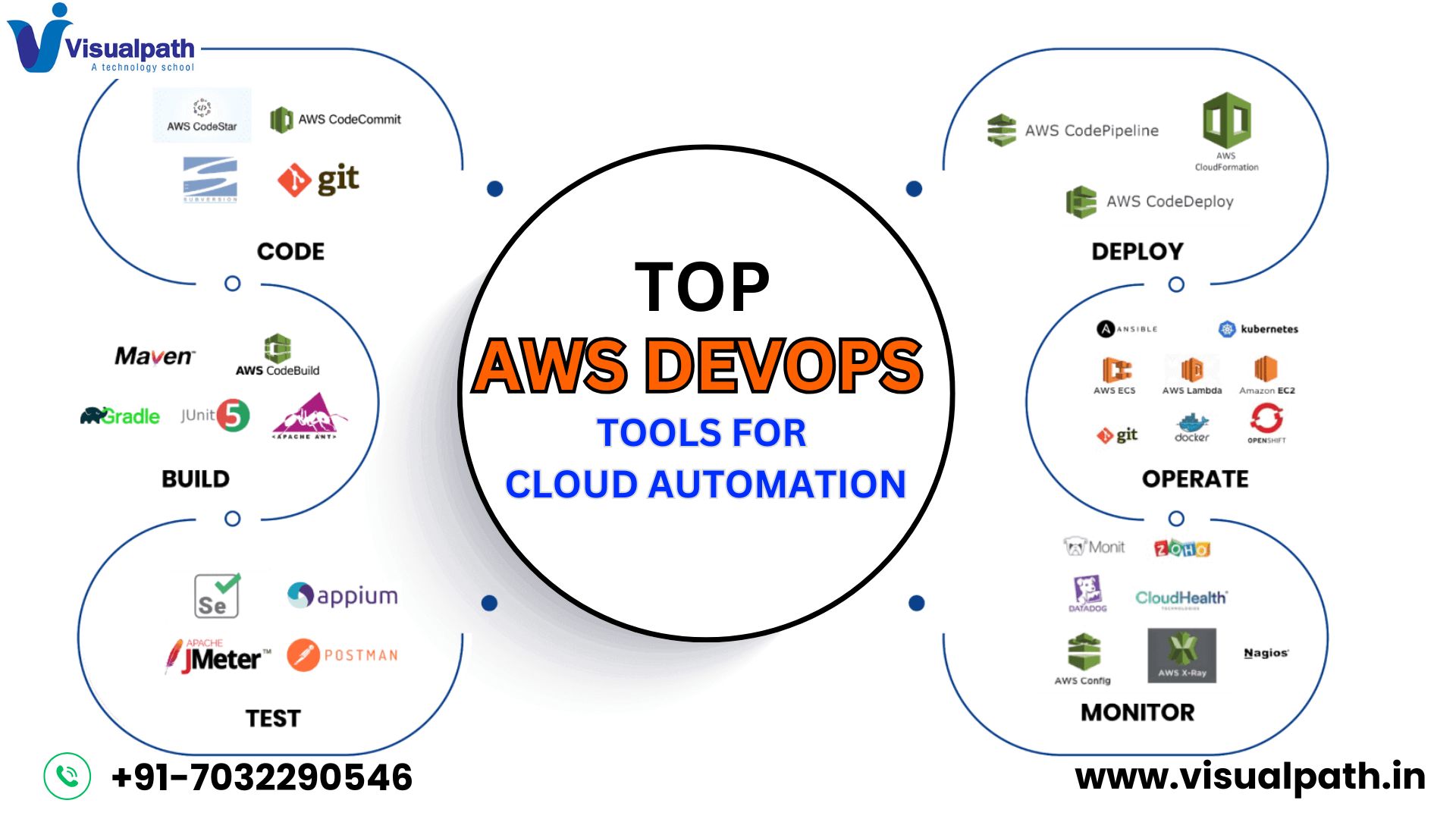
        Top AWS DevOps Tools for Cloud Automation

        Cloud automation has become a game-changer for businesses, enabling seamless software deployment and management. AWS DevOps Tools provide a powerful suite of services that help streamline development, deployment, and monitoring processes. From automating builds to managing cloud infrastructure, AWS offers a wide range of tools to enhance efficiency and scalability. Mastering these tools is essential for developers, system administrators, and IT professionals looking to optimize their DevOps workflows.

        Essential AWS DevOps Tools

        Organizations that embrace DevOps rely on AWS tools to ensure efficiency, security, and scalability. Below are some of the most widely used AWS DevOps tools:

        1. AWS CodePipeline

        AWS CodePipeline automates the software release process, making continuous integration and deployment (CI/CD) smoother. It allows teams to automate application builds, testing, and deployments, ensuring quick and reliable updates.

        2. AWS CodeBuild

        AWS Code Build is a fully managed build service that compiles source code, runs tests, and creates deployment-ready software packages. It eliminates the need to manage build servers, improving development speed.

        3. AWS Code Deploy

        AWS CodeDeploy simplifies deploying applications across AWS services such as EC2, Lambda, and on-premises servers. It helps minimize downtime by automating deployment strategies, such as rolling updates and blue-green deployments.

        4. AWS Cloud Formation

        AWS Cloud Formation enables Infrastructure as Code (IaC), allowing developers to define and provision AWS resources using templates. This ensures consistent deployments and reduces manual errors.

        5. AWS CloudWatch

        Monitoring and logging are crucial for cloud operations, and AWS CloudWatch provides real-time logs, metrics, and automated alerts. It helps DevOps teams track system performance, detect anomalies, and troubleshoot issues efficiently.

        Why Choose AWS DevOps for Automation?

        Cloud automation plays a vital role in accelerating software development and improving operational efficiency. AWS DevOps Training equips professionals with the necessary skills to automate infrastructure, implement CI/CD pipelines, and monitor cloud applications effectively. With a strong understanding of AWS DevOps, IT teams can minimize manual effort, reduce downtime, and optimize resource utilization.

        Moreover, automation ensures consistency across development, testing, and production environments. Organizations leveraging AWS DevOps can deploy updates faster, improve security, and enhance collaboration among development and operations teams. Whether working in a startup or a large enterprise, mastering AWS DevOps is crucial for staying competitive in the cloud computing landscape.

        Conclusion

        As cloud computing continues to dominate the IT industry, businesses need efficient automation solutions to scale their operations. AWS DevOps Online Training provides hands-on experience with essential tools like AWS CodePipeline, CodeDeploy, and CloudFormation. These tools empower developers and DevOps engineers to automate workflows, improve deployment speed, and maintain cloud infrastructure efficiently.

        For IT professionals looking to advance their careers, DevOps Online Training offers a comprehensive learning path. Gaining expertise in AWS DevOps tools is a step toward achieving cloud automation mastery, ensuring better job prospects and professional growth. As businesses move toward digital transformation, AWS DevOps skills will remain highly valuable in the ever-evolving cloud ecosystem.

        Trending Courses: MLOps, GCP DevOps, and Azure DevOps

      4. Why AWS DevOps is Essential for Cloud Success

        Why AWS DevOps is Essential for Cloud Success

        AWS DevOps is Essential plays a crucial role in optimizing cloud operations by enabling seamless automation, continuous integration, and deployment. Organizations leveraging AWS DevOps can significantly improve their software development lifecycle and maintain a competitive edge in the industry.

        What is AWS DevOps?

        AWS DevOps is a set of practices that combines development (Dev) and operations (Ops) to streamline software delivery and infrastructure management. It provides businesses with tools and methodologies to automate processes, enhance collaboration, and improve deployment speed.

        Some of the key AWS DevOps services include:

        • AWS CodePipeline for continuous integration and deployment
        • AWS CodeBuild for compiling and testing applications
        • AWS CodeDeploy for automated deployments
        • AWS CloudFormation for infrastructure as code
        • Amazon CloudWatch for monitoring and logging

        By leveraging these tools, businesses can efficiently manage their cloud infrastructure while ensuring reliability and scalability.

        Benefits of AWS DevOps

        1. Faster Development and Deployment

        AWS DevOps enables continuous integration and continuous deployment (CI/CD), reducing the time required to release new features or updates. By automating these processes, organizations can enhance productivity and efficiency.

        2. Improved Collaboration

        With AWS DevOps, development and operations teams can work together seamlessly, breaking down traditional silos. This collaborative approach ensures better communication, faster troubleshooting, and efficient deployment.

        3. Scalability and Reliability

        AWS DevOps ensures that businesses can scale their infrastructure effortlessly. Automated monitoring and logging tools help maintain system reliability while managing workloads efficiently.

        4. Cost Efficiency

        By automating repetitive tasks and optimizing resource utilization, AWS DevOps helps organizations reduce operational costs. Companies can allocate resources efficiently and avoid unnecessary expenses.

        The Role of AWS DevOps in Cloud Success

        AWS DevOps is essential for cloud success because it enhances agility, security, and innovation. With automated deployment pipelines, companies can quickly adapt to changing business requirements and ensure high availability.

        Additionally, AWS DevOps promotes security best practices by integrating compliance checks and automated security scans into the CI/CD pipeline. This ensures that cloud environments remain secure and compliant with industry standards.

        Enroll in DevOps Training in India

        To master AWS DevOps and enhance your career prospects, enrolling in DevOps Training is crucial. With the increasing demand for DevOps professionals, gaining hands-on experience and certification can open doors to high-paying job opportunities. AWS DevOps Training offers expert-led courses that cover key AWS DevOps concepts, hands-on labs, and real-time project implementation.

        Conclusion

        AWS DevOps is a game-changer in the cloud computing industry. By implementing AWS DevOps best practices, businesses can streamline their operations, improve collaboration, and achieve faster deployments. Enroll in DevOps Training in India today to gain expertise in AWS DevOps and stay ahead in the competitive IT landscape.

        Trending Courses: MLOps, GCP DevOps, and Azure DevOps

      5. Building Efficient CI/CD Pipelines in AWS DevOps

        Building Efficient CI/CD Pipelines in AWS DevOps

        CI/CD pipelines in AWS DevOps are essential for automating code integration, testing, and deployment, enabling teams to release software more frequently and reliably. AWS provides tools like CodeCommit, CodeBuild, CodeDeploy, and CodePipeline to streamline and automate these processes. This article discusses building some efficient CI/CD pipelines using AWS DevOps tools to improve software delivery speed and quality.

        What is CI/CD?

        Continuous Integration (CI) and Continuous Delivery (CD) automate the integration and deployment of code changes.

        A typical CI/CD pipeline consists of several stages:

        ·         Code Commit: Developers commit code changes.

        ·         Build: The code is compiled and packaged.

        ·         Test: Automated testing detects bugs early.

        ·         Deploy: The application is deployed to production or staging.

        By automating these stages, teams can release updates faster, reduce errors, and improve collaboration. AWS DevOps Training

        Key AWS Services for CI/CD Pipelines

        AWS provides several services to automate each stage of your CI/CD pipeline:

        1.     AWS CodeCommit: A secure Git repository for code storage and integration.

        2.     AWS CodeBuild: Automates the build process, compiles code, runs tests, and generates deployable artifacts.

        3.     AWS CodeDeploy: Automates deployment to environments like EC2, Lambda, and ECS.

        4.     AWS CodePipeline: Orchestrates the CI/CD process, integrating with other AWS services and triggering automated actions.

        5.     AWS CloudFormation: Defines infrastructure as code, ensuring consistency across environments.

        Steps to Build an Efficient CI/CD Pipeline on AWS

        1.     Set Up Version Control with AWS CodeCommit: Store code in a secure Git repository to trigger automation.

        2.     Automate the Build Process with AWS CodeBuild: CodeBuild compiles, tests, and generates deployable artifacts.

        3.     Automate Deployment with AWS CodeDeploy: CodeDeploy automates deployment to staging or production environments. AWS DevOps Online Training

        4.     Orchestrate the Pipeline with AWS CodePipeline: CodePipeline automates the flow from commit to deployment, integrating all stages.

        5.     Monitor and Optimize: Use AWS CloudWatch and CloudTrail to monitor pipeline performance and optimize for better efficiency.

        Best Practices for Efficient CI/CD Pipelines

        ·         Automate Everything: Automate every step to reduce errors and speed up delivery.

        ·         Parallel Execution: Use CodeBuild’s parallel processing to reduce build times.

        ·         Automated Testing: Catch bugs early with automated tests.

        ·         Infrastructure as Code: Manage infrastructure with AWS CloudFormation.

        ·         Monitor and Optimize: Regularly monitor and optimize the pipeline for performance.

        Conclusion

        By leveraging AWS DevOps tools like CodeCommit, CodeBuild, CodeDeploy, and CodePipeline, teams can automate their entire CI/CD process, speeding up software delivery and improving reliability. Implementing best practices like automation, parallel execution, and automated testing ensures a scalable and resilient pipeline that consistently delivers high-quality software.

        Trending Courses: MLOpsGCP DevOps, and Azure DevOps

        Visit: https://www.visualpath.in/online-aws-devops-training.html

      6. DevOps Pipeline: Key Components & Implementation Guide

        DevOps Pipeline: Key Components & Implementation Guide

        A DevOps pipeline helps organizations achieve this by automating the software development lifecycle, from coding to deployment. It ensures continuous integration, continuous delivery (CI/CD), and faster software releases with minimal manual intervention. This article explores the key components of a DevOps pipeline and how to implement it effectively.


        Key Components of a DevOps Pipeline

        1. Source Control Management

        Version control systems like Git, GitHub, GitLab, and Bitbucket help teams collaborate on code development. They enable tracking of changes, branch management, and maintaining code integrity.

        2. Continuous Integration (CI)

        Code change integration into a shared repository is automated by continuous integration (CI). Jenkins, GitHub Actions, CircleCI, and Azure DevOps are popular CI tools that help in testing and merging code changes frequently. DevOps Online Training

        3. Continuous Testing

        Finding issues early in the development cycle requires testing. Automated testing tools like Selenium, JUnit, TestNG, and Postman help in performing unit, integration, and functional testing to ensure software quality.

        4. Continuous Delivery (CD)

        CD ensures that code changes are automatically tested and prepared for deployment. Tools like Spinnaker, ArgoCD, and Harness help in automating deployments, ensuring quick and reliable releases.

        5. Configuration Management

        Managing infrastructure and application configurations is essential for consistency. Tools like Ansible, Chef, and Puppet automate configuration management and infrastructure provisioning. AWS DevOps Online Training

        6. Containerization & Orchestration

        Containers enable lightweight, portable deployments, while orchestration tools manage them efficiently. Docker helps in containerizing applications, and Kubernetes automates container orchestration, scaling, and deployment.

        7. Monitoring & Logging

        Monitoring tools ensure system health, detect issues, and provide performance insights. Prometheus, Grafana, ELK Stack (Elasticsearch, Logstash, Kibana), and Datadog help in tracking system performance, logs, and metrics.

        8. Security & Compliance

        Security is an integral part of DevOps. DevSecOps integrates security into the pipeline using tools like SonarQube, Snyk, and OWASP ZAP to identify vulnerabilities and enforce compliance.


        Implementing a DevOps Pipeline

        Step 1: Define Goals & Select Tools

        Start by identifying your business and technical objectives. Choose tools based on project requirements, team expertise, and scalability needs.

        Step 2: Set Up Source Control & CI/CD Tools

        Establish a Git repository and integrate it with a CI/CD tool like Jenkins or GitHub Actions. Automate code integration, testing, and delivery pipelines.

        Step 3: Automate Testing

        Implement unit, integration, and performance tests using testing frameworks to ensure code quality at every stage. DevOps Training

        Step 4: Deploy Using Containers & Orchestration

        Containerize applications using Docker and manage deployments with Kubernetes for scalability and reliability.

        Step 5: Implement Monitoring & Logging

        Set up monitoring tools like Prometheus and Grafana to track performance and detect anomalies.

        Step 6: Integrate Security

        Use security scanning tools to check vulnerabilities in code, dependencies, and container images before deployment.

        Step 7: Optimize & Improve

        Continuously optimize pipelines by analyzing performance metrics, resolving bottlenecks, and implementing best practices.


        Conclusion

        A well-implemented DevOps pipeline accelerates software delivery, enhances collaboration, and improves application quality. By leveraging automation, containerization, and monitoring, teams can ensure reliable, secure, and scalable deployments. Adopting DevOps best practices helps organizations stay competitive in today’s evolving technology landscape.

        Visualpath is the Leading and Best Software Online Training Institute in Hyderabad.

        For More Information about AWS DevOps Training

        Contact Call/WhatsApp: +91-7032290546

        Visit: https://www.visualpath.in/online-aws-devops-training.html