Tag: AWSDevSecOpsTraining

  • What Are AWS DevSecOps Tools?

    What Are AWS DevSecOps Tools?

    Amazon Web Services (AWS) provides a comprehensive suite of tools to support DevSecOps, seamlessly integrating security into the software development lifecycle (SDLC). These tools help organizations automate security practices, making security an inherent part of both development and operations. Here are some key AWS DevSecOps tools and their functionalities.

    Key AWS DevSecOps Tools

    AWS Code Pipeline

    Function: A continuous integration and continuous delivery (CI/CD) service that automates the build, test, and deploy phases of applications. CodePipeline integrates with various security tools to include security checks at every stage of the deployment process, ensuring that vulnerabilities are caught early.  AWS DevSecOps Online Training

    AWS Code Build

    Function: A fully managed build service that compiles source code, runs tests, and produces software packages. CodeBuild can be integrated with static application security testing (SAST) tools to scan code for vulnerabilities during the build process, ensuring secure code from the start.  DevSecOps Training Online

    AWS Code Deploy

    Function: Automates code deployments to various instances, including Amazon EC2 and on-premises servers. CodeDeploy can include security validation steps within its deployment process, ensuring that all deployments adhere to security standards.  DevSecOps Training in Hyderabad

    AWS Cloud Formation

    Function: Facilitates the provisioning and management of AWS infrastructure as code. CloudFormation templates can be used to set up infrastructure with built-in security configurations, such as IAM roles and policies, ensuring secure infrastructure deployment.  DevSecOps Course in Hyderabad

    AWS Security Hub

    Function: Offers a comprehensive view of security alerts and compliance status across AWS accounts. Security Hub integrates with various AWS services and third-party tools to aggregate, organize, and prioritize security findings, providing centralized security management.   AWS DevSecOps Training

    Amazon Inspector

    Function: An automated security assessment service that helps improve the security and compliance of applications deployed on AWS. Inspector automatically assesses applications for vulnerabilities and deviations from best practices.  DevSecOps Training in Ameerpet

     Visualpath is the Best Software Online Training Institute in Hyderabad. Avail complete AWS DevSecOps Online Training worldwide. You will get the best course at an affordable cost.

    Call on – +91-9989971070

    WhatsApp: https://www.whatsapp.com/catalog/917032290546/

    Visit: https://www.visualpath.in/aws-devsecops-online-training.html
  • What Are The Functions Of The Shell? In AWS DevSecOps

    What Are The Functions Of The Shell? In AWS DevSecOps

    In AWS DevSecOps, the shell is a powerful tool that supports automation, management, and security. It plays a crucial role in integrating development, security, and operations, ensuring streamlined workflows and robust security measures. Here are the primary functions of the shell in this environment:

    1. Automation and Scripting

    The shell enables the automation of repetitive tasks through scripting. Shell scripts can automate the deployment of applications, infrastructure provisioning, and security checks. This reduces manual effort, minimizes errors, and speeds up processes. In AWS, shell scripts often work with AWS CLI to manage services like EC2, S3, and RDS efficiently.  DevSecOps Training Online

    2. Configuration Management

    Managing configurations across different environments is simplified using the shell. It helps in setting up and managing environment variables, configuration files, and system settings. This ensures consistency and reliability across development, testing, and production environments.  DevSecOps Training in Hyderabad

    3. Infrastructure as Code (IaC)

    The shell supports Infrastructure as Code practices by facilitating the use of tools like AWS CloudFormation and Terraform. With shell commands, teams can define, deploy, and manage infrastructure in a codified and version-controlled manner. This makes infrastructure changes reproducible and auditable.  AWS DevSecOps Online Training

    4. Security Automation

    Security is integral to DevSecOps, and the shell aids in automating security tasks. Shell scripts can automate vulnerability scans, compliance checks, and security patching. They can integrate with AWS security tools such as AWS Inspector and AWS Config to enforce security policies and monitor compliance continuously.

    5. CI/CD Pipeline Integration

    The shell is vital in continuous integration and continuous deployment (CI/CD) pipelines. It helps automate the build, test, and deployment processes. Shell scripts can trigger builds, run automated tests, and deploy applications to AWS environments. This integration ensures quick, reliable, and secure delivery of software updates.  AWS DevSecOps Training

    6. Monitoring and Logging

    Monitoring and logging are essential for maintaining system health and security. The shell can manage and configure AWS CloudWatch for real-time monitoring and logging. It allows the setup of alerts and the collection of logs, providing insights into system performance and potential security issues.

    Conclusion

    In AWS DevSecOps, the shell is indispensable for automation, configuration management, infrastructure provisioning, security, CI/CD integration, and monitoring. Its versatility and power make it a critical tool for ensuring efficient, secure, and reliable operations across the DevSecOps lifecycle.

    Visualpath is the Best Software Online Training Institute in Hyderabad. Avail complete AWS DevSecOps Online Training worldwide. You will get the best course at an affordable cost.

    Call on – +91-9989971070

    WhatsApp: https://www.whatsapp.com/catalog/917032290546/

    Visit: https://www.visualpath.in/aws-devsecops-online-training.html
  • Why Ansible And Ansible Architecture

    Why Ansible And Ansible Architecture

    Why Ansible And Ansible Architecture

    In today’s fast-paced IT environment, automation is key to enhancing efficiency, consistency, and reliability. Ansible, an open-source automation tool, has gained significant traction due to its simplicity, agentless architecture, and powerful capabilities. This article delves into why Ansible is widely adopted and explores its architecture.

    Why Ansible?

    1. Simplicity and Ease of Use:

    Ansible uses YAML, a human-readable language, for its playbooks, making it accessible even to those with minimal programming experience. Its straightforward syntax allows users to define tasks in a clear and concise manner, reducing the learning curve.   DevSecOps Training in Ameerpet

    2. Agentless Architecture:

    Unlike other automation tools, Ansible does not require the installation of agents on target machines. It relies on SSH (Secure Shell) for Unix-like systems and WinRM (Windows Remote Management) for Windows systems. This reduces overhead and simplifies the management of nodes.  DevSecOps Training Online

    3. Flexibility and Power:

    Ansible is highly flexible and can manage a wide range of IT tasks, from configuration management and application deployment to orchestration and provisioning. Its extensive module library allows users to automate virtually any aspect of their IT infrastructure.  AWS DevSecOps Training in Ameerpet

    4. Idempotency:

    Ansible ensures that repeated executions of playbooks do not produce unintended side effects. This idempotent nature guarantees that the target system reaches the desired state regardless of its initial state, enhancing reliability and consistency.

    5. Community and Enterprise Support:

    With a strong open-source community and robust enterprise support through Red Hat Ansible Automation Platform, users have access to a wealth of resources, plugins, and modules. This community-driven approach ensures continuous improvement and innovation.  AWS DevSecOps Training

    Ansible Architecture

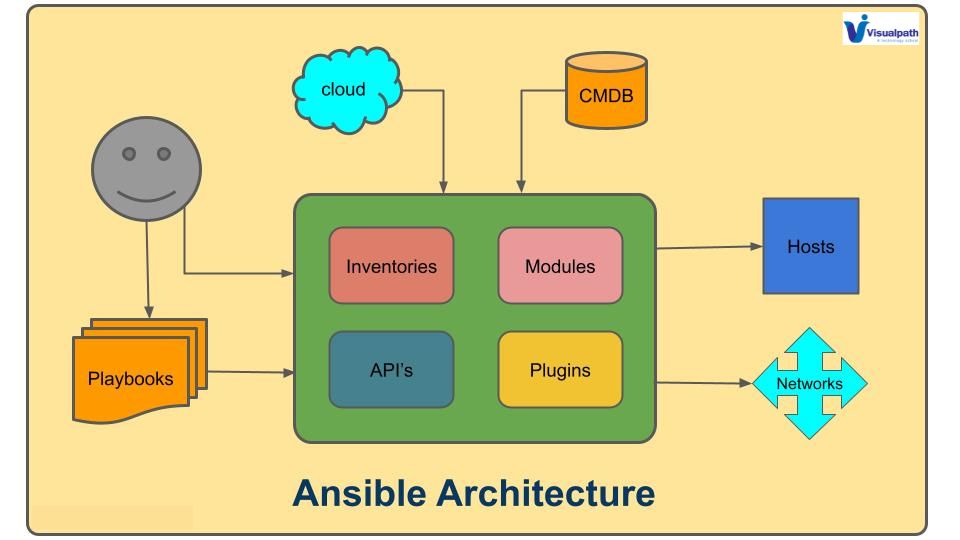
    1. Control Node:

    The control node is where Ansible is installed. It contains the necessary playbooks, modules, and configuration files. Users run Ansible commands from this node, which then communicates with the managed nodes. 

    2. Managed Nodes:

    These are the target systems that Ansible manages. Managed nodes can be any device accessible via SSH or WinRM, including servers, cloud instances, and network devices.  DevSecOps Course in Hyderabad

    3. Inventory:

    The inventory is a file or a directory containing information about the managed nodes. It can be static or dynamically generated, detailing the hostnames or IP addresses of the nodes and their grouping.

    4. Modules:

    Modules are the core components that perform specific tasks on managed nodes. They can range from basic operations like file manipulation and package installation to complex tasks like cloud provisioning.

    5. Playbooks:

    Playbooks are YAML files where users define a series of tasks to be executed on managed nodes. They outline the desired state and the steps required to achieve it.

    6. Plugins:

    Plugins extend Ansible’s functionality. They can be used for tasks such as logging, caching, and inventory management.  DevSecOps Training in Hyderabad

    Visualpath is the Best Software Online Training Institute in Hyderabad. Avail complete AWS DevSecOps Online Training worldwide. You will get the best course at an affordable cost.

    Call on – +91-9989971070

    WhatsApp: https://www.whatsapp.com/catalog/919989971070

    Visit: https://www.visualpath.in/aws-devsecops-online-training.html
  • What are the types of shells in Linux?

    What are the types of shells in Linux?

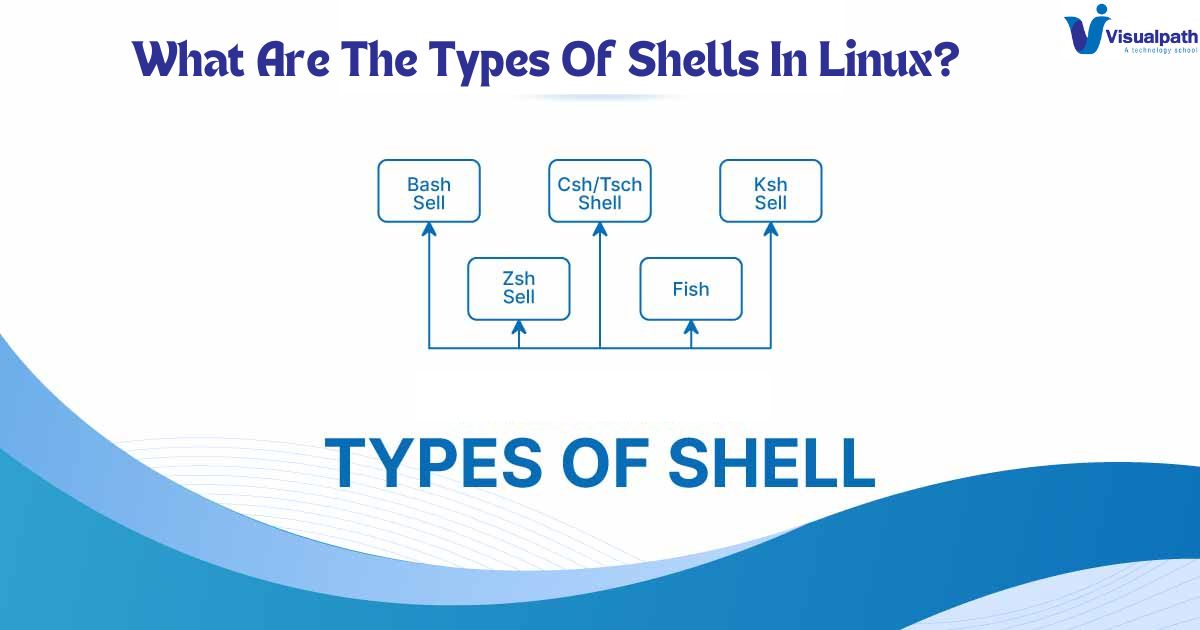
    In the world of Linux, the shell is a crucial component that serves as an interface between the user and the kernel. It allows users to execute commands, run scripts, and manage the system. There are several types of shells in Linux, each with unique features and use cases. Here are some of the most common types:

    1. Bash (Bourne Again Shell)

    Bash is the most widely used shell in Linux distributions. It is an enhanced version of the original Bourne Shell (sh) and includes features from the Korn Shell (ksh) and the C Shell (csh). Bash is known for its ease of use, extensive scripting capabilities, and compatibility with Bourne Shell scripts. Features like command completion, command history, and scripting functions make it a powerful tool for both beginners and advanced usersDevSecOps Training in Hyderabad

    2. Zsh (Z Shell)

    Zsh is another popular shell that extends the functionality of Bash. It includes features like improved auto-completion, spelling correction, and themeable prompts. Zsh is highly customizable and supports a wide array of plugins, making it a favorite among power users who prefer a personalized and efficient working environment. Oh-My-Zsh, a community-driven framework for managing Zsh configurations, enhances its appeal further.   DevSecOps Course in Hyderabad

    3. Ksh (Korn Shell)

    Developed by David Korn in the early 1980s, the Korn Shell (ksh) combines features of the Bourne Shell and the C Shell. Ksh offers robust scripting capabilities, including associative arrays and floating-point arithmetic, which are not available in Bash. While it is not as commonly used as Bash, it remains popular in certain enterprise environments due to its performance and scripting power. AWS DevSecOps Training

    4. Tcsh (TENEX C Shell)

    Tcsh is an enhanced version of the original C Shell (csh). It adds features like command-line editing, programmable word completion, and spell checking. Tcsh is particularly favored in academic and research environments where users appreciate its scripting syntax, which is reminiscent of the C programming language.  DevSecOps Training Online

    5. Fish (Friendly Interactive Shell)

    Fish is designed to be user-friendly and interactive. It provides features such as syntax highlighting, tab completion, and an intuitive scripting syntax. Unlike other shells, Fish does not aim for POSIX compliance, which can be a limitation for some users but an advantage for those who prioritize ease of use and modern features.

    DevSecOps Training in Ameerpet

    Conclusion

    Choosing the right shell depends on the user’s needs and preferences. Bash remains the default for most Linux distributions, but alternatives like Zsh, Ksh, Tcsh, and Fish offer compelling features that cater to various user requirements. Each shell has its unique strengths, making the Linux environment flexible and adaptable to different workflows.

    Visualpath is the Best Software Online Training Institute in Hyderabad. Avail complete AWS DevSecOps Online Training worldwide. You will get the best course at an affordable cost.

    Call on – +91-9989971070

    WhatsApp: https://www.whatsapp.com/catalog/919989971070

    Visit: https://visualpath.in/aws-devsecops-online-training.html
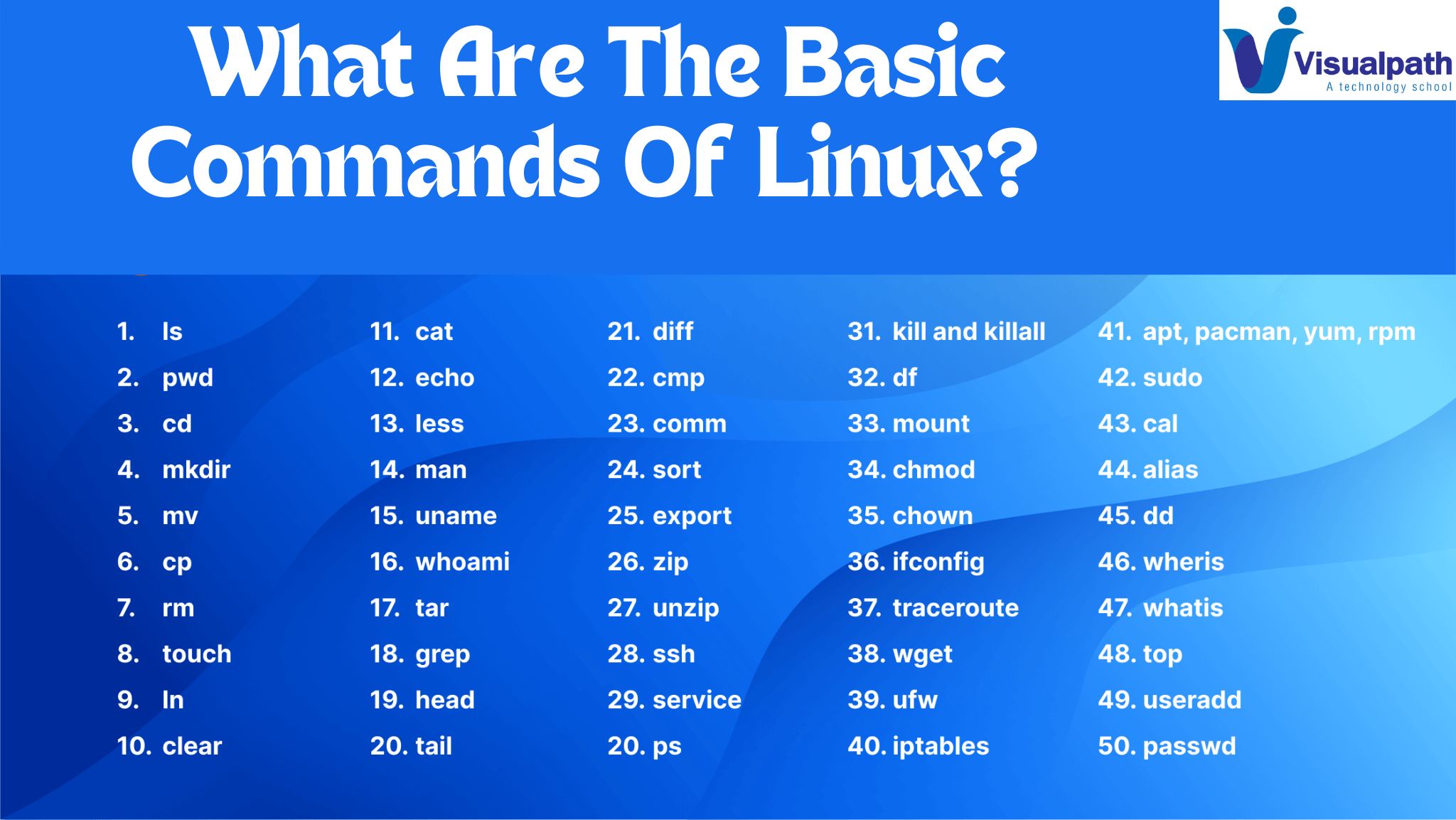
  • What Are The Basic Commands Of Linux?

    What Are The Basic Commands Of Linux?

    Linux, with its powerful command-line interface, is renowned for its versatility and efficiency. Whether you’re a seasoned sysadmin or a novice user, mastering the fundamental commands is essential for navigating and managing your Linux system effectively. Let’s explore some of the basic commands that every Linux user should know:  DevSecOps Training in Hyderabad

    ls: Perhaps the most fundamental command, ls, lists the contents of a directory. By default, it displays the names of files and directories in the current directory.

    cd: Short for “change directory,” cd allows you to navigate between different directories within the file system. Simply specify the directory you want to move to as an argument.  DevSecOps Course in Hyderabad

    pwd: Stands for “print working directory.” pwd displays the full path of the current directory you’re in.  AWS DevSecOps Training

    mkdir: Need to create a new directory? Use mkdir followed by the name of the directory you wish to create.  AWS DevSecOps Online Training

    rmdir: Conversely, rmdir is used to remove directories. Be cautious, though—rmdir only works on empty directories.  AWS DevSecOps Training in Ameerpet

    touch: Want to create an empty file or update the timestamp of an existing file? Touch is the command for you. 

    rm: Short for “remove,” rm is used to delete files and directories. Exercise caution, as deleted files cannot be easily recovered.  DevSecOps Training in Ameerpet

    cp: Need to make a copy of a file or directory? Cp allows you to do just that. Specify the source file/directory and the destination.

    mv: Similar to cp, mv moves files and directories from one location to another. However, mv also serves as the command to rename files and directories.

    cat: Short for “concatenate,” cat is primarily used to display the contents of a file. It can also be used to create, concatenate, and display files.

    more/less: When dealing with large files, more and less come in handy for viewing file contents page by page. Less provides more advanced features like searching and navigation.  DevSecOps Training Online

    grep: Need to search for a specific pattern within a file? Grep allows you to search for text patterns using regular expressions.

    chmod: Stands for “change mode.” Chmod is used to modify the permissions of files and directories, determining who can read, write, or execute them.

    chown: Short for “change owner,” chown allows you to change the ownership of files and directories.  DevSecOps Training Institute in Hyderabad 

    sudo: When you need to perform administrative tasks, sudo grants you temporary superuser privileges. Use it with caution, as improper use can have serious consequences.

    These are just a few of the essential Linux commands that form the foundation of mastering the Linux command line. By familiarizing yourself with these commands and their functionalities, you’ll be well-equipped to tackle a wide range of tasks and unleash the full potential of your Linux system.

    Visualpath is the Best Software Online Training Institute in Hyderabad. Avail complete AWS DevSecOps Online Training worldwide. You will get the best course at an affordable cost.

    Call on – +91-9989971070

  • What is Amazon VPC?

    What is Amazon VPC?

    In the realm of cloud computing, Virtual Private Cloud (VPC) stands as a cornerstone of network architecture, providing a secure and isolated environment for deploying resources within a public cloud infrastructure. Understanding what VPC is and its significance is essential for organizations leveraging cloud services effectively.

    At its essence, a VPC is a logically isolated virtual network within a public cloud provider’s infrastructure, such as Amazon Web Services (AWS), Google Cloud Platform (GCP), or Microsoft Azure. It enables users to define and control a virtual network environment, including IP address ranges, subnets, routing tables, and network gateways, while leveraging the scalability and flexibility of the cloud. DevSecOps Training in Hyderabad

    One of the primary benefits of VPC is its ability to create a secure and private network environment within the public cloud. By segmenting the cloud infrastructure into isolated virtual networks, organizations can ensure that their resources are shielded from unauthorized access and potential security threats. This isolation enhances data privacy and regulatory compliance, particularly for industries with strict compliance requirements, such as healthcare and finance. DevSecOps Course in Hyderabad

    VPCs also offer granular control over network traffic and connectivity, allowing organizations to define and enforce custom networking policies based on their specific requirements. With features like network access control lists (ACLs), security groups, and virtual private gateways (VPNs), users can regulate inbound and outbound traffic, restrict access to resources, and establish secure connections between on-premises data centers and cloud environments.  AWS DevSecOps Training

    Scalability is another key advantage of VPCs. As organizations scale their cloud infrastructure to accommodate growing workloads and user demands, VPCs provide the flexibility to expand network resources dynamically without disrupting existing services. Users can add or remove subnets, adjust IP address ranges, and provision additional network resources on demand, ensuring that the network infrastructure scales seamlessly with business needs. AWS DevSecOps Online Training

    Moreover, VPCs facilitate hybrid cloud and multi-cloud deployments, enabling organizations to seamlessly integrate their on-premises infrastructure with cloud environments. By establishing secure VPN connections or direct interconnects, users can extend their corporate network into the cloud while maintaining a consistent and secure networking environment across distributed environments. AWS DevSecOps Training in Ameerpet

    In conclusion,

    Virtual Private Cloud (VPC) is a foundational component of cloud networking, offering organizations the flexibility, security, and scalability needed to deploy and manage resources in the cloud effectively. By leveraging VPCs, organizations can create isolated and secure network environments, enforce custom networking policies, and seamlessly scale their infrastructure to meet evolving business requirements.

    Visualpath is the Best Software Online Training Institute in Hyderabad. Avail complete AWS DevSecOps Online Training worldwide. You will get the best course at an affordable cost.

    Call on – +91-9989971070.

    WhatsApp: https://www.whatsapp.com/catalog/919989971070

    Visit: https://www.visualpath.in/aws-devsecops-online-training.html