Tag: AWSDevsecops

  • DevOps Security: Integrating DevSecOps for a Secure Development Lifecycle

    DevOps Security: Integrating DevSecOps for a Secure Development Lifecycle

    DevOps has revolutionized software development, enabling faster and more efficient delivery of high-quality applications. However, with increased speed comes the need for enhanced security measures. Integrating DevSecOps into the development lifecycle ensures that security is woven into every stage of the process, protecting against vulnerabilities and maintaining robust security standards.

    The Need for DevSecOps

    Traditional security approaches often treat security as a separate, final step in the development process. This method can lead to delays, increased costs, and the potential for vulnerabilities to go undetected until the end stages of development. DevSecOps addresses these challenges by embedding security throughout the entire development lifecycle, from initial design through to deployment and beyond.

    By incorporating security early and continuously, organizations can:

    1. Identify and Mitigate Risks Early: Detect and address security issues before they become significant problems.
    2. Accelerate Development: Reduce the time spent on rework and fixes by integrating security into the development process. DevOps Training
    3. Improve Compliance: Ensure that applications meet regulatory and compliance requirements from the outset.

    Key Principles of DevSecOps

    1. Shift Left: Integrate security practices early in the development process. The earlier security is considered, the easier and less expensive it is to address vulnerabilities.
    2. Automation: Use automated tools and processes to enforce security policies, conduct vulnerability assessments, and perform continuous monitoring.
    3. Collaboration: Foster collaboration between development, operations, and security teams to ensure that security is a shared responsibility.
    4. Continuous Improvement: Regularly review and update security practices and tools to adapt to emerging threats and vulnerabilities.
    5. Security as Code: Treat security policies and configurations as code, ensuring they are version-controlled and easily auditable.

    Implementing DevSecOps

    1. Culture and Mindset:
      1. Foster a Security-first Culture: Encourage all team members to prioritize security and understand their role in maintaining it.
      1. Training and Education: Provide ongoing training for developers, operations, and security teams on secure coding practices and the latest security threats. DevOps Training Online
    2. Secure Development Practices:
      1. Threat Modeling: Identify potential threats and vulnerabilities early in the design phase.
      1. Secure Coding Standards: Establish and enforce coding standards that promote security.
      1. Code Reviews: Implement regular code reviews with a focus on security.
    3. Automated Security Testing:
      1. Static Application Security Testing (SAST): Analyze source code for vulnerabilities without executing the code.
      1. Dynamic Application Security Testing (DAST): Test running applications to identify vulnerabilities that could be exploited in a production environment. AWS DevOps Training
      1. Interactive Application Security Testing (IAST): Combine SAST and DAST to provide a comprehensive security analysis during runtime.
    4. Continuous Integration and Continuous Deployment (CI/CD):
      1. Security in CI/CD Pipelines: Integrate security checks into CI/CD pipelines to automate security testing at every stage of the development lifecycle.
      1. Automated Deployments: Use automated deployment tools to ensure consistent and secure configurations across environments.
    5. Infrastructure as Code (IaC):
      1. Secure Configurations: Define and enforce security configurations in code, ensuring that infrastructure is provisioned securely and consistently.
      1. Policy as Code: Use tools like Open Policy Agent (OPA) to enforce security policies in IaC deployments.
    6. Monitoring and Incident Response:
      1. Continuous Monitoring: Implement monitoring tools to detect and respond to security incidents in real-time.
      1. Incident Response Plan: Develop and regularly update an incident response plan to quickly address and mitigate security breaches.

    Case Study: Implementing DevSecOps in a Financial Services Company

    A financial services company faced increasing regulatory requirements and the need to secure sensitive customer data while maintaining a rapid development pace. By adopting DevSecOps, they transformed their development process to prioritize security.

    1. Automated Security Testing: They integrated SAST and DAST tools into their CI/CD pipeline, ensuring that every code change was automatically scanned for vulnerabilities.
    2. Infrastructure as Code: Using IaC tools, they defined secure configurations for their cloud infrastructure, reducing the risk of misconfigurations.
    3. Continuous Monitoring: They deployed real-time monitoring solutions to detect and respond to security incidents swiftly. DevOps Online Training

    As a result, the company achieved a significant reduction in security vulnerabilities, improved compliance with regulatory standards, and maintained a high development velocity.

    Tools for DevSecOps

    • Static Analysis: Tools like SonarQube, Checkmarx, and Fortify.
    • Dynamic Analysis: Tools like OWASP ZAP, Burp Suite, and Acunetix.
    • Container Security: Tools like Aqua Security, Twistlock, and Clair.
    • Infrastructure as Code: Tools like Terraform, AWS CloudFormation, and Azure Resource Manager with security-focused plugins.
    • Policy as Code: Tools like Open Policy Agent (OPA) and HashiCorp Sentinel.

    Conclusion

    Integrating DevSecOps into your development lifecycle is essential for delivering secure, high-quality software at speed. By shifting security left, automating security practices, fostering collaboration, and continuously improving, organizations can build a robust security posture. DevSecOps is not just a set of tools or processes but a cultural shift that requires commitment from all stakeholders. Embrace DevSecOps to stay ahead of security threats and deliver secure applications that meet the needs of your users and comply with regulatory requirements. AWS DevOps Online Training 

    Visualpath is the Leading and Best Software Online Training Institute in Hyderabad. Avail complete DevOps Training Worldwide. You will get the best course at an affordable cost.

    Call on – +91-9989971070

    WhatsApphttps://www.whatsapp.com/catalog/917032290546/

    Visit   https://www.visualpath.in/devops-online-training.html

  • What is Docker in DevOps? A Comprehensive Guide for Beginners

    What is Docker in DevOps? A Comprehensive Guide for Beginners

    Docker is a tool that enhances collaboration between developers and administrators by creating consistent, portable environments for applications. It is integral to many DevOps toolchains, enabling developers to write code without worrying about deployment environments. Docker containers package applications and their dependencies, ensuring they run uniformly across various systems. This streamlines the development, testing, and deployment processes.

    What is Docker?

    Docker is an open-source platform designed to automate the deployment, scaling, and administration of applications. Applications and their dependencies are packaged into containers to accomplish this.Containers are lightweight, portable units that run consistently across different computing environments, from a developer’s local machine to a production server.

    Core Concepts of Docker

    1. Images: A Docker image is a read-only template that contains the application code, libraries, dependencies, and runtime needed to run the application. A Docker file contains a collection of instructions used to build images.
    2. Containers: Containers are instances of Docker images. They are isolated environments where applications run. Containers are ephemeral, meaning they can be started, stopped, moved, or deleted easily. DevOps Training
    3. Docker file: A Docker file is a script that contains a series of instructions on how to build a Docker image. It defines the base image to use, the software to install, and any configuration or setup required for the application.
    4. Docker Hub: Docker Hub is a cloud-based repository where Docker users can create, test, store, and distribute container images. It hosts official images for popular applications and operating systems, as well as images shared by the community.
    5. Volumes: Volumes are used to persist data generated by and used by Docker containers. They are essential for data persistence and sharing data between containers.

    Benefits of Using Docker in DevOps

    1. Consistency and Isolation: Docker ensures that applications run the same way regardless of where they are deployed. Because containers offer isolation, conflicts between dependencies and programs are avoided.
    2. Scalability: Docker makes it easy to scale applications horizontally by adding more container instances. This is particularly useful in micro services architectures where each service runs in its own container.
    3. Efficiency: Containers are lightweight and use system resources more efficiently than traditional virtual machines. They share the host system’s kernel, which reduces overhead and improves performance. DevOps Training Online
    4. Portability: Docker containers can run on any system that supports Docker, including different cloud providers and on-premises servers. This portability simplifies the deployment process and avoids vendor lock-in.
    5. Continuous Integration and Continuous Deployment (CI/CD): Docker integrates seamlessly with CI/CD pipelines, enabling automated testing, building, and deployment of applications. This speeds up the release cycle and ensures higher quality software.

    Docker in the DevOps Workflow

    1. Development: Developers use Docker to create consistent development environments. By writing a Dockerfile, they can define the exact environment needed for their application, ensuring that “it works on my machine” issues are minimized.
    2. Testing: Automated testing is a critical part of the DevOps workflow. Docker allows for the creation of disposable container instances that can be used to run tests in isolated environments, ensuring that tests do not interfere with each other.
    3. Continuous Integration (CI): In a CI pipeline, Docker is used to build and test applications in a consistent environment. This guarantees that code modifications are verified prior to being integrated into the primary codebase.
    4. Deployment: Docker simplifies the deployment process by packaging applications and their dependencies into containers. These containers can be deployed to any environment that supports Docker, including cloud services and on-premises servers.
    5. Monitoring and Logging: Monitoring and logging are essential for maintaining the health and performance of applications. Docker provides tools for monitoring container metrics and collecting logs, which can be integrated with existing monitoring solutions.

    Getting Started with Docker

    1. Install Docker: Begin by installing Docker on your local machine. Docker offers installation packages for Windows, macOS, and Linux, among other operating systems. AWS DevOps Training
    2. Learn the Basics: Familiarize yourself with Docker commands and concepts. Start by running basic containers, exploring Docker Hub, and writing simple Docker files.
    3. Build and Run Your First Container: Create a Dockerfile for a simple application, build a Docker image, and run it as a container. This hands-on experience will help solidify your understanding of Docker.
    4. Explore Advanced Features: Once you are comfortable with the basics, explore more advanced features such as networking, volumes, and Docker Compose for multi-container applications.

    Conclusion

    The development, testing, and deployment of apps have been completely transformed by Docker. Its ability to provide consistent, isolated environments and seamless integration with DevOps practices makes it an invaluable tool for modern software development. By understanding the core concepts and benefits of Docker, beginners can harness its power to improve their DevOps workflows and deliver high-quality software more efficiently. As you continue your journey with Docker, you’ll find that its flexibility and scalability open up new possibilities for innovation and growth in your projects. DevOps Online Training

    Visualpath is the Leading and Best Software Online Training Institute in Hyderabad. Avail complete DevOps Training Worldwide. You will get the best course at an affordable cost.

    Call on – +91-9989971070

    WhatsApphttps://www.whatsapp.com/catalog/917032290546/

    Visit   https://www.visualpath.in/devops-online-training.html

  • What Are The Functions Of The Shell? In AWS DevSecOps

    What Are The Functions Of The Shell? In AWS DevSecOps

    In AWS DevSecOps, the shell is a powerful tool that supports automation, management, and security. It plays a crucial role in integrating development, security, and operations, ensuring streamlined workflows and robust security measures. Here are the primary functions of the shell in this environment:

    1. Automation and Scripting

    The shell enables the automation of repetitive tasks through scripting. Shell scripts can automate the deployment of applications, infrastructure provisioning, and security checks. This reduces manual effort, minimizes errors, and speeds up processes. In AWS, shell scripts often work with AWS CLI to manage services like EC2, S3, and RDS efficiently.  DevSecOps Training Online

    2. Configuration Management

    Managing configurations across different environments is simplified using the shell. It helps in setting up and managing environment variables, configuration files, and system settings. This ensures consistency and reliability across development, testing, and production environments.  DevSecOps Training in Hyderabad

    3. Infrastructure as Code (IaC)

    The shell supports Infrastructure as Code practices by facilitating the use of tools like AWS CloudFormation and Terraform. With shell commands, teams can define, deploy, and manage infrastructure in a codified and version-controlled manner. This makes infrastructure changes reproducible and auditable.  AWS DevSecOps Online Training

    4. Security Automation

    Security is integral to DevSecOps, and the shell aids in automating security tasks. Shell scripts can automate vulnerability scans, compliance checks, and security patching. They can integrate with AWS security tools such as AWS Inspector and AWS Config to enforce security policies and monitor compliance continuously.

    5. CI/CD Pipeline Integration

    The shell is vital in continuous integration and continuous deployment (CI/CD) pipelines. It helps automate the build, test, and deployment processes. Shell scripts can trigger builds, run automated tests, and deploy applications to AWS environments. This integration ensures quick, reliable, and secure delivery of software updates.  AWS DevSecOps Training

    6. Monitoring and Logging

    Monitoring and logging are essential for maintaining system health and security. The shell can manage and configure AWS CloudWatch for real-time monitoring and logging. It allows the setup of alerts and the collection of logs, providing insights into system performance and potential security issues.

    Conclusion

    In AWS DevSecOps, the shell is indispensable for automation, configuration management, infrastructure provisioning, security, CI/CD integration, and monitoring. Its versatility and power make it a critical tool for ensuring efficient, secure, and reliable operations across the DevSecOps lifecycle.

    Visualpath is the Best Software Online Training Institute in Hyderabad. Avail complete AWS DevSecOps Online Training worldwide. You will get the best course at an affordable cost.

    Call on – +91-9989971070

    WhatsApp: https://www.whatsapp.com/catalog/917032290546/

    Visit: https://www.visualpath.in/aws-devsecops-online-training.html

  • DevOps: Reducing Risk and Improving Reliability

    DevOps: Reducing Risk and Improving Reliability

    DevOps emerges as a sturdy fortress within this jungle, fostering a culture of collaboration and continuous improvement. By bridging the gap between development (Dev) and operations (Ops) teams, DevOps empowers organizations to build resilient and reliable software delivery pipelines, significantly reducing risk and ensuring consistent software performance.

    This article delves into how DevOps practices mitigate risk and enhance reliability throughout the software development lifecycle. We’ll explore key benefits, core practices, and the cultural shift DevOps necessitates to create a truly robust development environment.

    Why Risk Reduction Matters in DevOps

    Software development inherently involves risk. Bugs, security vulnerabilities, and infrastructure issues can lead to costly downtime, user dissatisfaction, and reputational damage. Traditional workflows, with infrequent deployments and limited communication, exacerbate these risks.

    Here’s how DevOps tackles these issues:

    • Smaller Deployments: DevOps promotes breaking down large feature sets into smaller, incremental releases. This allows for faster identification and resolution of issues, minimizing the impact on users. DevOps Training
    • Continuous Integration and Delivery (CI/CD): Automating the build, test, and deployment process with CI/CD pipelines ensures consistent code quality and rapid feedback. Any potential problems are caught early in the cycle, preventing them from reaching production.
    • Infrastructure as Code (IaC): Defining infrastructure configurations as code allows for automated provisioning and management. This reduces human error and ensures consistent and reliable infrastructure environments.
    • Shift-Left Security: Integrating security testing throughout the development lifecycle, not just at the end, proactively identifies and addresses vulnerabilities.

    How DevOps Improves Reliability

    Reliability refers to a system’s ability to perform consistently and meet its intended purpose. In software development, a reliable system delivers a seamless user experience with minimal downtime or outages. DevOps practices contribute significantly to software reliability in several ways: DevOps Online Training

    • Focus on Monitoring and Feedback: DevOps emphasizes continuous monitoring of applications and infrastructure. This allows for proactive identification of performance bottlenecks or potential failures before they impact users.
    • Automated Rollbacks and Recovery: When issues do arise, automated rollback mechanisms allow for a swift return to a stable state, minimizing downtime and data loss.
    • Infrastructure Redundancy: DevOps principles advocate for building infrastructure with redundancy, ensuring failover capabilities that maintain system availability even during component failures. DevOps Training Online

    Key DevOps Practices for Risk Reduction and Improved Reliability

    Several specific DevOps practices act as building blocks for a robust and reliable delivery pipeline. A few of the most prominent ones are listed below:

    • Version Control Systems (VCS): Tools like Git enable developers to track code changes, revert to previous versions if necessary, and maintain a clear history of the codebase.
    • Configuration Management: Tools like Ansible or Chef automate the configuration of infrastructure components, ensuring consistency and reducing configuration drift.
    • Test Automation: Automating unit tests, integration tests, and performance tests provides rapid feedback on code quality and functionality, catching issues early and preventing regressions. DevOps Training in Hyderabad
    • Continuous Feedback Loops: Fostering continuous communication and feedback exchange between Dev and Ops teams helps identify potential problems early and improve overall system reliability.

    Building a Culture of Shared Responsibility

    DevOps goes beyond just tools and processes. It’s a cultural shift towards shared responsibility, collaboration, and a focus on delivering high-quality software. Here are some ways to cultivate this culture:

    • Breaking Down Silos: Encourage open communication and collaboration between Dev and Ops teams. Foster cross-functional knowledge sharing to build a shared understanding of the software development and delivery process.
    • Shared Metrics and Goals: Align Dev and Ops on common metrics that measure not just individual team performance, but also the overall success of the software delivery pipeline. Focus on metrics like release frequency, lead time for changes, and deployment failure rates. DevOps Training in Ameerpet
    • Blameless Post-mortems: When issues arise, conduct blameless post-mortems to understand root causes and implement improvements to prevent future occurrences. Focus on learning and improvement rather than assigning blame.

    The Benefits of Reduced Risk and Improved Reliability

    By reducing risk and enhancing reliability, DevOps unlocks a range of benefits for organizations:

    • Faster Time to Market: With smaller deployments and a streamlined pipeline, DevOps enables faster delivery of features to users.
    • Improved User Experience: Higher reliability translates to a more stable and predictable user experience, leading to increased user satisfaction and loyalty.
    • Reduced Costs: Fewer errors, faster deployments, and less downtime translate to significant cost savings. DevOps Online Training Institute Hyderabad  
    • Increased Innovation: By reducing development risks and improving operational efficiency, DevOps frees up resources for teams to focus on innovation and new features.

    Conclusion

    DevOps is not a silver bullet, but it provides a powerful framework for achieving a more streamlined, reliable, and efficient software delivery process. By automating manual tasks, fostering collaboration, and emphasizing continuous improvement, DevOps empowers organizations to deliver high-quality software that meets user needs

    Visualpath is the Leading and Best Software Online Training Institute in Hyderabad. Avail complete DevOps Training Worldwide. You will get the best course at an affordable cost.

    WhatsApphttps://www.whatsapp.com/catalog/919989971070

    Visit   https://www.visualpath.in/devops-online-training.html

  • What Are The Basic Commands Of Linux?

    What Are The Basic Commands Of Linux?

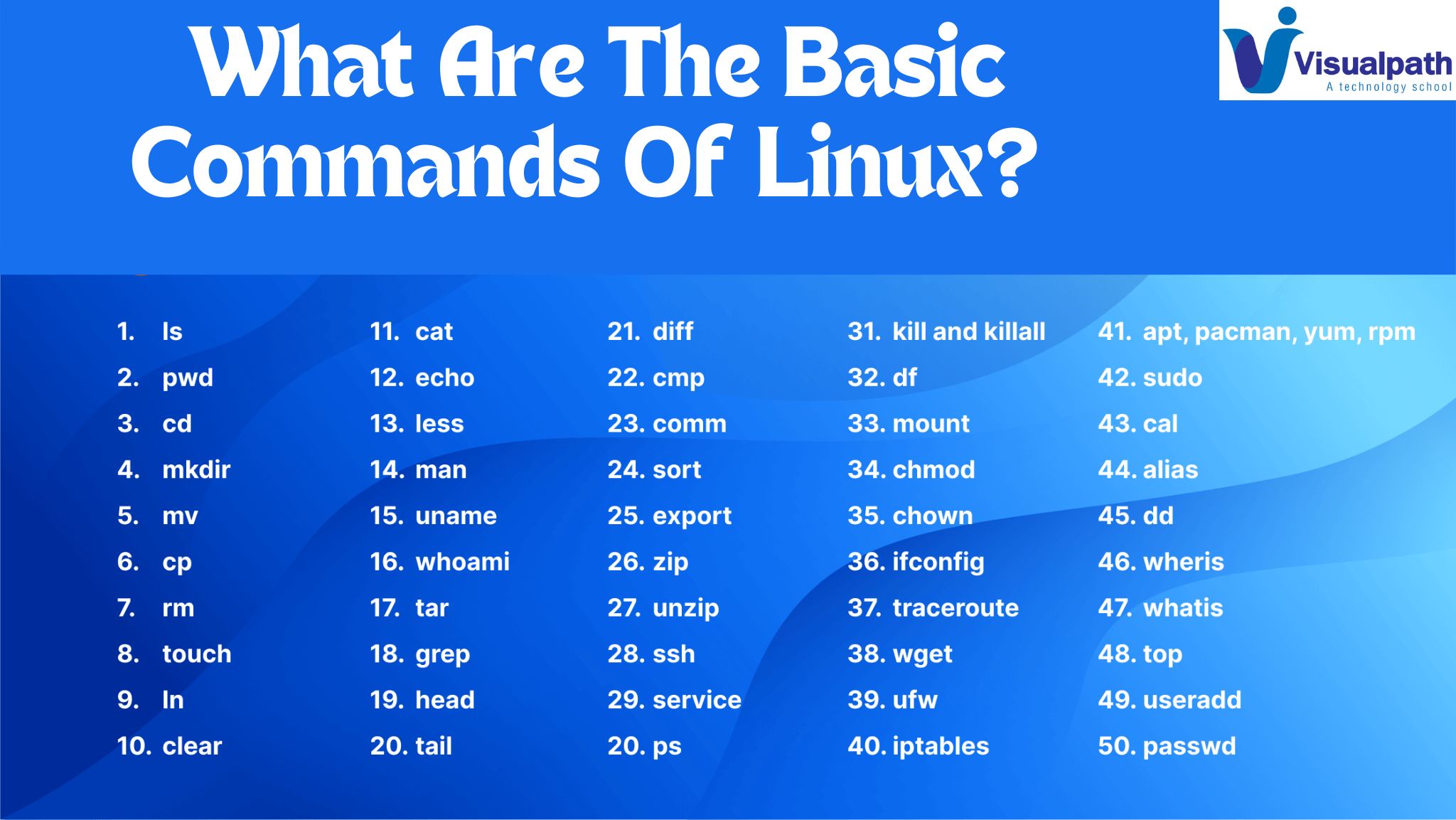
    Linux, with its powerful command-line interface, is renowned for its versatility and efficiency. Whether you’re a seasoned sysadmin or a novice user, mastering the fundamental commands is essential for navigating and managing your Linux system effectively. Let’s explore some of the basic commands that every Linux user should know:  DevSecOps Training in Hyderabad

    ls: Perhaps the most fundamental command, ls, lists the contents of a directory. By default, it displays the names of files and directories in the current directory.

    cd: Short for “change directory,” cd allows you to navigate between different directories within the file system. Simply specify the directory you want to move to as an argument.  DevSecOps Course in Hyderabad

    pwd: Stands for “print working directory.” pwd displays the full path of the current directory you’re in.  AWS DevSecOps Training

    mkdir: Need to create a new directory? Use mkdir followed by the name of the directory you wish to create.  AWS DevSecOps Online Training

    rmdir: Conversely, rmdir is used to remove directories. Be cautious, though—rmdir only works on empty directories.  AWS DevSecOps Training in Ameerpet

    touch: Want to create an empty file or update the timestamp of an existing file? Touch is the command for you. 

    rm: Short for “remove,” rm is used to delete files and directories. Exercise caution, as deleted files cannot be easily recovered.  DevSecOps Training in Ameerpet

    cp: Need to make a copy of a file or directory? Cp allows you to do just that. Specify the source file/directory and the destination.

    mv: Similar to cp, mv moves files and directories from one location to another. However, mv also serves as the command to rename files and directories.

    cat: Short for “concatenate,” cat is primarily used to display the contents of a file. It can also be used to create, concatenate, and display files.

    more/less: When dealing with large files, more and less come in handy for viewing file contents page by page. Less provides more advanced features like searching and navigation.  DevSecOps Training Online

    grep: Need to search for a specific pattern within a file? Grep allows you to search for text patterns using regular expressions.

    chmod: Stands for “change mode.” Chmod is used to modify the permissions of files and directories, determining who can read, write, or execute them.

    chown: Short for “change owner,” chown allows you to change the ownership of files and directories.  DevSecOps Training Institute in Hyderabad 

    sudo: When you need to perform administrative tasks, sudo grants you temporary superuser privileges. Use it with caution, as improper use can have serious consequences.

    These are just a few of the essential Linux commands that form the foundation of mastering the Linux command line. By familiarizing yourself with these commands and their functionalities, you’ll be well-equipped to tackle a wide range of tasks and unleash the full potential of your Linux system.

    Visualpath is the Best Software Online Training Institute in Hyderabad. Avail complete AWS DevSecOps Online Training worldwide. You will get the best course at an affordable cost.

    Call on – +91-9989971070

  • What is Amazon VPC?

    What is Amazon VPC?

    In the realm of cloud computing, Virtual Private Cloud (VPC) stands as a cornerstone of network architecture, providing a secure and isolated environment for deploying resources within a public cloud infrastructure. Understanding what VPC is and its significance is essential for organizations leveraging cloud services effectively.

    At its essence, a VPC is a logically isolated virtual network within a public cloud provider’s infrastructure, such as Amazon Web Services (AWS), Google Cloud Platform (GCP), or Microsoft Azure. It enables users to define and control a virtual network environment, including IP address ranges, subnets, routing tables, and network gateways, while leveraging the scalability and flexibility of the cloud. DevSecOps Training in Hyderabad

    One of the primary benefits of VPC is its ability to create a secure and private network environment within the public cloud. By segmenting the cloud infrastructure into isolated virtual networks, organizations can ensure that their resources are shielded from unauthorized access and potential security threats. This isolation enhances data privacy and regulatory compliance, particularly for industries with strict compliance requirements, such as healthcare and finance. DevSecOps Course in Hyderabad

    VPCs also offer granular control over network traffic and connectivity, allowing organizations to define and enforce custom networking policies based on their specific requirements. With features like network access control lists (ACLs), security groups, and virtual private gateways (VPNs), users can regulate inbound and outbound traffic, restrict access to resources, and establish secure connections between on-premises data centers and cloud environments.  AWS DevSecOps Training

    Scalability is another key advantage of VPCs. As organizations scale their cloud infrastructure to accommodate growing workloads and user demands, VPCs provide the flexibility to expand network resources dynamically without disrupting existing services. Users can add or remove subnets, adjust IP address ranges, and provision additional network resources on demand, ensuring that the network infrastructure scales seamlessly with business needs. AWS DevSecOps Online Training

    Moreover, VPCs facilitate hybrid cloud and multi-cloud deployments, enabling organizations to seamlessly integrate their on-premises infrastructure with cloud environments. By establishing secure VPN connections or direct interconnects, users can extend their corporate network into the cloud while maintaining a consistent and secure networking environment across distributed environments. AWS DevSecOps Training in Ameerpet

    In conclusion,

    Virtual Private Cloud (VPC) is a foundational component of cloud networking, offering organizations the flexibility, security, and scalability needed to deploy and manage resources in the cloud effectively. By leveraging VPCs, organizations can create isolated and secure network environments, enforce custom networking policies, and seamlessly scale their infrastructure to meet evolving business requirements.

    Visualpath is the Best Software Online Training Institute in Hyderabad. Avail complete AWS DevSecOps Online Training worldwide. You will get the best course at an affordable cost.

    Call on – +91-9989971070.

    WhatsApp: https://www.whatsapp.com/catalog/919989971070

    Visit: https://www.visualpath.in/aws-devsecops-online-training.html